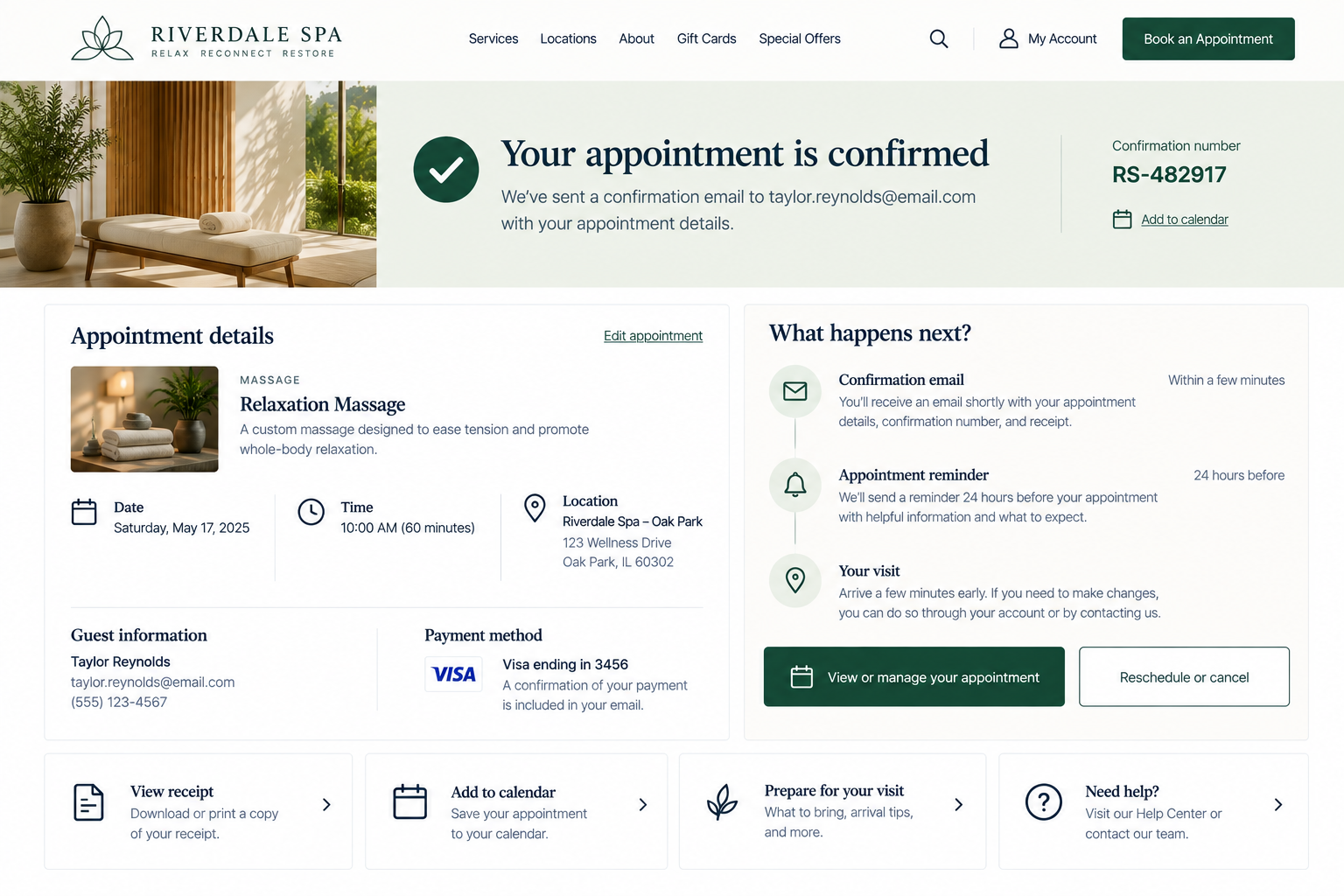
Post-Conversion Confirmation
Can visitors immediately tell their action was successful and understand what will happen next, when, and whether they need to do anything?
Clicking Place Order, Book Appointment, Submit Application, or another final action shouldn’t leave visitors wondering what happened. Yet too often, visitors are left uncertain.
Sometimes the page simply reloads with little explanation. A quick Success! message appears, but offers no real details. Visitors are left unsure if they’ll get an email, when they’ll hear back, or if there’s anything else they need to do. This uncertainty can take away from an experience that was working well up to that point.
Immediately after a conversion, visitors should be able to answer:
Did it work?
What exactly did I submit, purchase, or book?
What happens next?
Do I have a record I can refer to later?
1. Clearly confirm completion and provide a useful summary
UX Check: Right after someone completes an action, is it clear that it worked and what exactly was completed?
Clearly tell visitors that their action was completed using specific language such as Your order has been placed or Your appointment is confirmed rather than vague messages like Success!
Provide a useful summary of key details, such as the order, appointment, payment, or request information and any reference number.
Visitors should be able to confirm at a glance: Yes, that’s what I intended to do.
2. Explain what happens next and provide an appropriate record
UX Check: Do visitors know what to expect next, and do they have the information they’ll need if they want to refer back to this action?
After confirming completion, clearly explain what happens next and when visitors can expect it.
Be specific about timing, next steps, and any actions they need to take. Provide an appropriate record, such as a confirmation number, receipt, booking reference, or link to manage the transaction, when the action warrants one.
Visitors should know what to expect and how to find or verify the transaction later.
3. Send a useful confirmation message when appropriate
UX Check: If visitors are likely to need this information later, do we send them a confirmation they can easily return to?
For important purchases, bookings, or submissions, provide a confirmation visitors can access after leaving the website.
A confirmation email should clearly identify the action and include useful details such as what was purchased or submitted, amount paid, timing, reference number, next steps, management links, and support information.
If visitors should expect an email, tell them where it was sent. Not every action requires one, but important information shouldn’t exist only on a confirmation screen.
Make the handoff after conversion feel complete
The experience doesn’t end when someone clicks the final button. That’s simply where the next part begins.
Confirm right away that the action was successful. Give visitors a clear summary of what they completed. Explain what happens next and when. Provide a record they can refer to. And if they’ll need the information later, send a confirmation they can easily find.
The goal is to replace uncertainty with a clear understanding of: It worked. This is what I did. This is what happens next.
Review your website experience
Your homepage is just one part of the experience visitors have with your website.
The Website Experience Snapshot is a free resource that helps you evaluate across nine areas of your website—from your homepage and navigation to conversion, mobile, accessibility, and the overall site experience. Use it to spot where visitors may be running into friction and where improvements could make the biggest difference.