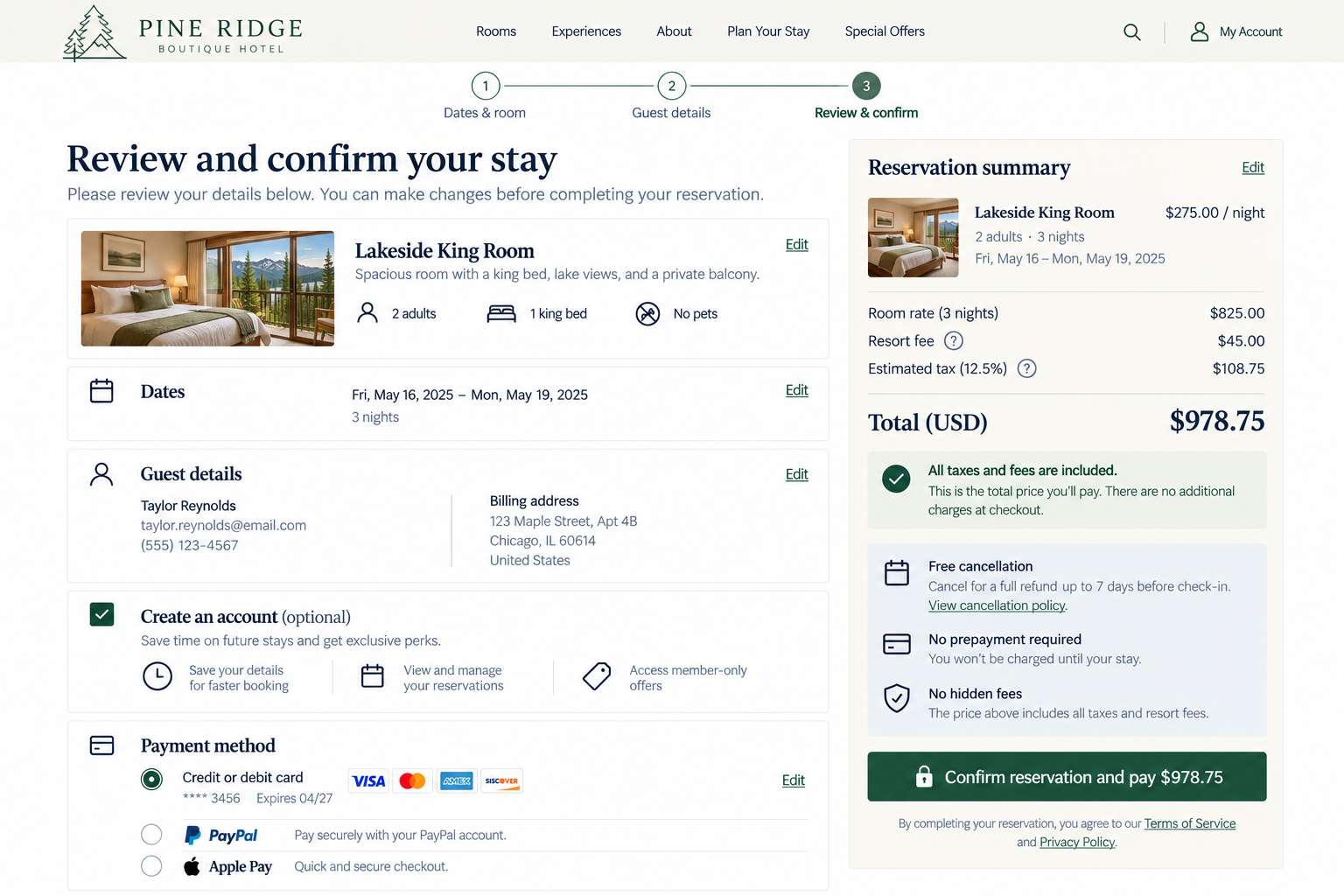
Conversion Confidence
Can visitors understand and verify costs, commitments, and key details before completing the action?
The final step of a conversion carries more weight than the steps that came before it. A visitor may be about to spend money, submit personal information, make a reservation, start a subscription, send an application, or commit to something else that may be difficult to change later. Before taking action, visitors need to know exactly what they’re agreeing to. If visitors feel uncertain at this stage, they may hesitate, even if everything else has gone smoothly.
Your conversion process should help visitors confidently answer:
Have I selected the right things?
What will this actually cost me?
Are there important terms or commitments I need to know about?
What exactly will happen when I take the final action?
1. Avoid artificial urgency and pressure
UX Check: Are we giving visitors room to make an informed decision without creating unnecessary pressure?
Genuine urgency, such as limited availability or a real promotion deadline, can help visitors make informed decisions.
Avoid countdown timers, exaggerated scarcity, or warnings designed primarily to pressure people into acting. Visitors should have enough space to review their decision without feeling rushed.
The goal is to help visitors understand genuine time-sensitive information, not create anxiety to push a faster decision.
2. Provide a clear, editable summary of selections
UX Check: Can visitors easily review what they’ve selected and correct anything that’s wrong before committing?
Before completing an action, visitors should be able to verify their choices. The relevant details depend on the conversion.
For an online purchase, that might include products, quantities, sizes, colors, delivery method, and shipping address.
For a booking, it could include the service, location, date, time, number of guests, or selected options.
For a subscription, it may include the plan, billing frequency, number of users, and selected add-ons.
Make it easy to correct mistakes without starting over or losing other information.
The summary should answer one question: Is this what I intended to choose?
3. Communicate the expected total cost before commitment
UX Check: Can visitors understand how much they’re expected to pay before they agree to the transaction?
Visitors should not find out the real cost after they’ve already committed. Show the full financial commitment before the final action, as accurately as possible.
Include relevant charges such as price, taxes, shipping, service or booking fees, required add-ons, discounts, and recurring costs.
If the final amount isn’t yet known, explain what is known and what could change.
Don’t highlight a low initial price while hiding required fees.
4. Clearly communicate the value of account creation
UX Check: If we’re asking visitors to create an account, do they understand why it benefits them?
Sometimes account creation is optional. Sometimes it’s a meaningful part of the relationship after the conversion.
Make it clear what an account allows visitors to do, such as track orders, manage appointments, access purchases, save preferences, or return to an application.
Describe benefits in specific, practical terms rather than simply asking visitors to Sign Up. If account creation includes a membership, enrollment, or ongoing commitment, make that clear upfront.
Account creation should be a clear choice with obvious value, not just another unexplained requirement.
5. Provide trusted payment options and clearly explain their terms
UX Check: Can visitors choose an appropriate payment method and understand any important conditions attached to it?
Payment options can affect whether someone feels comfortable completing a transaction. Offer payment methods that fit your audience and transaction, and make them easy to recognize.
Make meaningful differences between payment options clear. For saved payment methods, show which one is selected and make it easy to change.
At payment, visitors should know how they are paying and what that choice means.
6. Provide a clear, scannable review step when appropriate
UX Check: Does the importance or complexity of this conversion warrant a final opportunity to review everything together?
Not every action needs a review step, but it becomes more valuable when the commitment is significant or difficult to reverse.
Bring key details, such as selections, personal information, dates, payment method, total cost, important terms, and policies, together in an easy-to-scan summary.
When possible, let visitors edit individual details without losing their progress.
A review step should help visitors confirm their decision, not just add another screen.
7. Disclose material information before the final step
UX Check: Have visitors been told everything that could reasonably affect their decision before they’re asked to commit?
Disclose any information that could meaningfully affect a visitor’s decision before they commit, such as recurring billing, automatic renewal, cancellation restrictions, nonrefundable payments, required fees, trial terms, or important limitations.
Don’t bury these conditions in lengthy terms. Make significant costs, commitments, and restrictions clear before signup, payment, or submission.
The final step should confirm the decision, not introduce new information that could have changed it.
8. Make the final action and its consequences unambiguous
UX Check: Does the final button clearly communicate what will happen when visitors select it?
Use specific wording for the final action so visitors understand exactly what will happen.
Labels such as Place Order, Pay $125, Confirm Reservation, or Start Paid Subscription are clearer than generic buttons like Continue or Submit.
Before acting, visitors should understand the cost, important terms, and consequences of their decision.
Make it clear when visitors are still reviewing and when they are committing.
Make the commitment feel informed, not uncertain
The final stage of conversion shouldn’t require visitors to take a leap of faith. Before committing, they should be able to review what they’ve selected, understand the expected cost, recognize important terms, and know exactly what will happen next.
Avoid creating pressure. Let visitors edit important choices. Explain payment and account implications. Show key conditions before the final step. Make the final action unmistakable.
The goal is not to remove every possible concern. It is to make sure visitors do not have to wonder what they are actually agreeing to at the moment you ask them to commit.
Review your website experience
Your homepage is just one part of the experience visitors have with your website.
The Website Experience Snapshot is a free resource that helps you evaluate across nine areas of your website—from your homepage and navigation to conversion, mobile, accessibility, and the overall site experience. Use it to spot where visitors may be running into friction and where improvements could make the biggest difference.