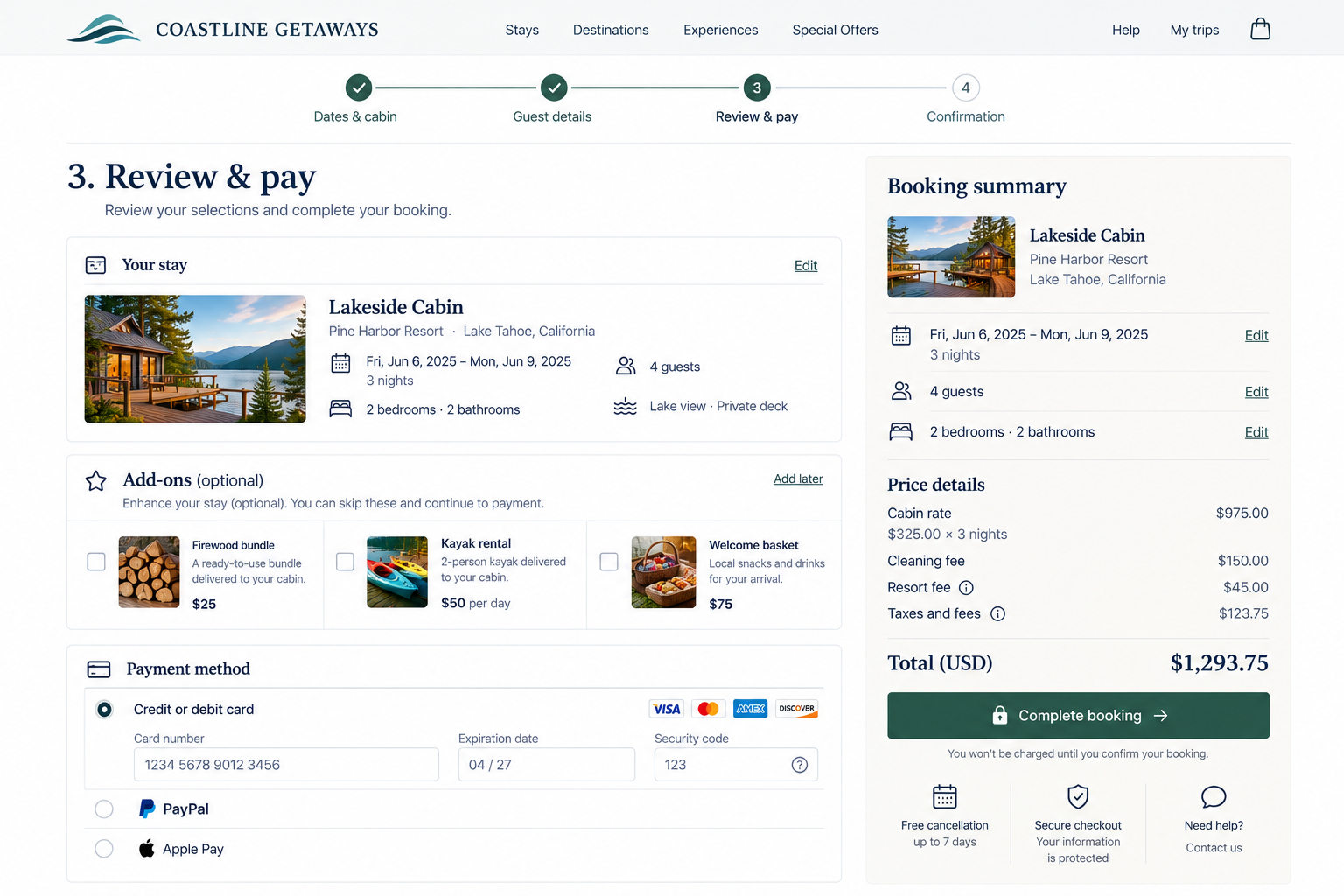
Conversion Process and Progress
Can visitors complete the process without distractions, repeated steps, or losing progress?
Once someone decides to buy, book, register, donate, request a quote, or take another important action, the website has a new job: help them finish.
At this stage, adding extra steps or confusion only gets in the way. A conversion process can become difficult when visitors encounter too many steps, unclear actions, repeated work, distracting offers, lost information, or moments when they aren’t sure whether anything is happening. Small interruptions may seem minor, but together they can slow people down.
Your conversion process should help visitors understand:
What do I need to do next?
How much more is left?
Will the information and selections I’ve already made be preserved?
Did the action I just took actually work?
1. Make the primary conversion path and actions clear
UX Check: At each stage of the process, is it obvious what visitors need to do to continue?
Once someone starts a process, they should know what step they’re on and how to move forward.
Use specific action labels such as Continue to Payment, Review Order, or Submit Application rather than vague labels like Continue or Next.
Be especially clear with final actions involving a purchase, payment, reservation, or submission. The primary action should stand out so visitors never have to guess what moves them forward.
2. Minimize unnecessary steps and distractions
UX Check: Does every step in the conversion process serve a necessary purpose?
A longer process isn’t necessarily a problem if each step serves a purpose.
Look for steps that can be combined, repeated questions, unnecessary account creation, duplicate information, or interruptions like popups and promotions that distract from completion.
Keep useful explanations, policies, and review options, but remove anything that doesn’t help visitors finish what they started.
3. Clearly communicate and preserve progress
UX Check: Do visitors know where they are in the process, what’s left, and can they move through it without losing completed work?
For multi-step processes, help visitors understand where they are and how much remains with a clear progress indicator when appropriate.
Just as importantly, preserve completed work. Visitors shouldn’t lose information when moving backward, refreshing a page, encountering an error, or reviewing previous answers.
For longer processes, consider allowing visitors to leave and return later without starting over.
4. Preserve selected or saved items and clearly confirm changes
UX Check: Do visitors remain in control of the items or selections they’re converting on?
Selections made before or during conversion, such as products, dates, tickets, service packages, or appointments, should remain intact unless the visitor changes them.
When something changes, clearly confirm the result, including updates to quantity, price, availability, or related selections. If the website must change something unexpectedly, explain what happened and what the visitor can do next.
Visitors shouldn’t have to double-check that their choices were preserved.
5. Keep additional offers secondary to the primary conversion task
UX Check: Are additional offers helping, or distracting visitors from finishing what they came to do?
Additional products, upgrades, warranties, memberships, or other offers can be useful during conversion, but the main task should remain the priority.
Avoid repeatedly interrupting visitors with extras or giving optional offers the same prominence as the action needed to continue.
Make it clear when add-ons are optional so visitors can consider them without losing sight of what they came to do.
6. Provide clear feedback while actions are processing
UX Check: When the website is working on something, can visitors tell that their action was received?
Some actions aren’t immediate. A payment may need to process. A reservation may need to be checked. A file may need to be uploaded. An application may take a few seconds to submit.
Without feedback, visitors may think nothing happened.
Use loading indicators, progress messages, disabled buttons, or status updates such as Processing payment… or Checking availability… so visitors know what’s happening.
Prevent accidental duplicate actions, and provide ongoing feedback if processing takes longer than expected.
Help visitors maintain momentum
Once someone starts a conversion process, they’ve already made an important decision. Your website’s job is to help them finish what they started.
Make the path forward obvious. Remove unnecessary steps and distractions. Show visitors their progress and preserve the work they’ve already completed. Keep their selected items intact, make additional offers secondary, and provide feedback while the website processes an action.
A good conversion process doesn’t rush visitors or remove information they need. It clears away anything that gets between I’ve decided to do this and I’ve finished.
Review your website experience
Your homepage is just one part of the experience visitors have with your website.
The Website Experience Snapshot is a free resource that helps you evaluate across nine areas of your website—from your homepage and navigation to conversion, mobile, accessibility, and the overall site experience. Use it to spot where visitors may be running into friction and where improvements could make the biggest difference.