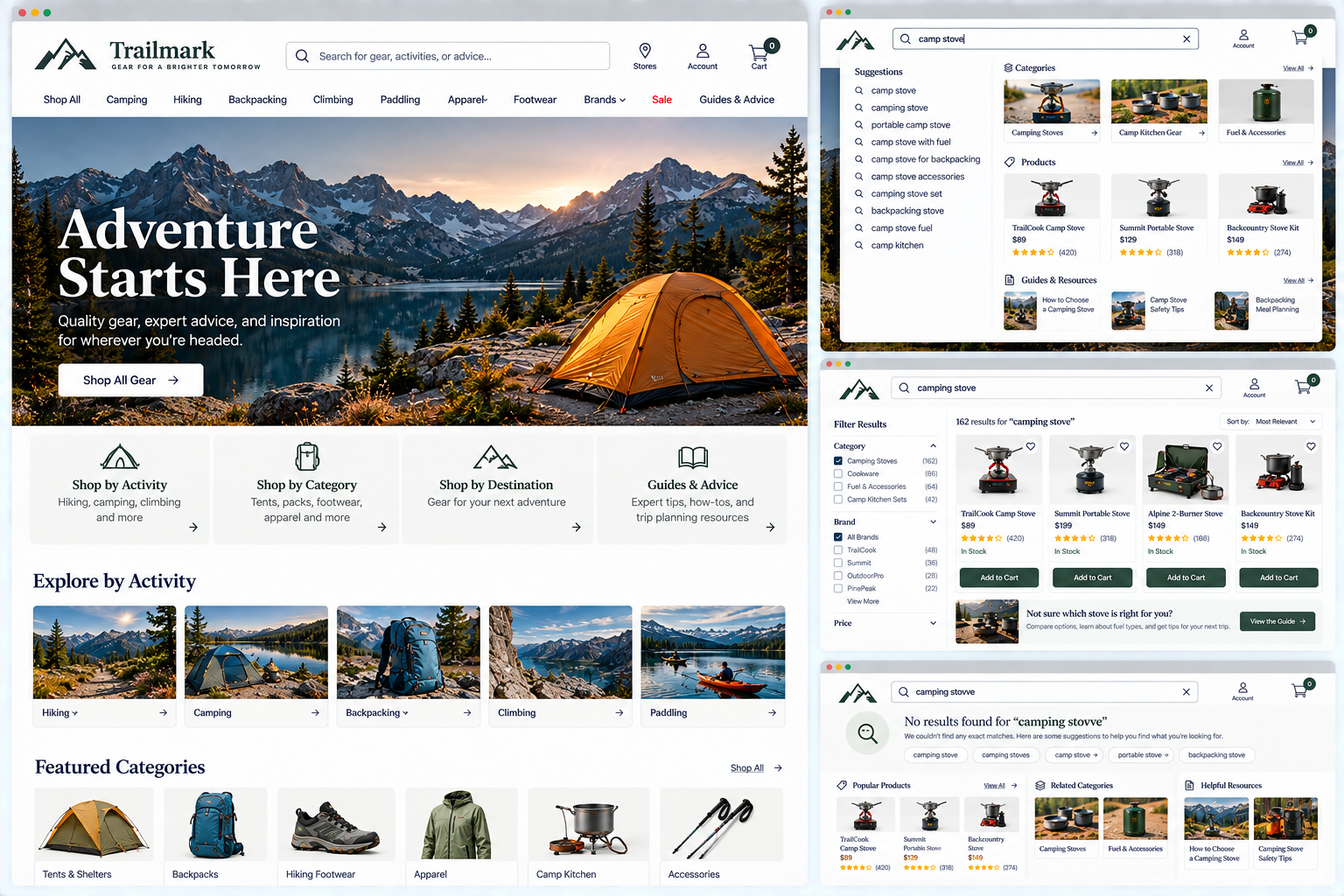
Product & service Discovery
Can visitors find relevant offerings whether they know what they want or are still exploring?
Visitors don’t always arrive knowing exactly what they need. Some may know the specific product, service, or solution they’re seeking. Others may know the problem they want to solve but not which option is right for them. Some may simply want to see what’s available.
Your website should support all of them.
Visitors shouldn’t have to know your terminology, guess the right category, or follow a single path to find what they need.
Visitors should be able to answer questions such as:
What options are available to me?
Where should I start if I’m not sure what I need?
Can I search for something specific?
What happens if my first attempt doesn’t work?
1. Provide more than one effective discovery path
UX Check: Can visitors find your products or services in more than one reasonable way?
Not everyone looks for information the same way. Some visitors use navigation or categories, while others rely on search, homepage links, or related pages.
Your website shouldn’t depend on a single path. A retailer might make running shoes accessible through Shoes, Running, search, and recommendations, while a service business might connect to services from industry, problem, or audience pages.
You don’t need to support every possible route. Provide enough meaningful paths that visitors can find what they need even if their first approach doesn’t match your structure.
2. Support exploratory discovery for visitors who do not know exactly what they need
UX Check: Can visitors make progress even if they don’t know exactly what they need?
Not every visitor knows exactly what product or service they need. Give them ways to narrow their options through categories, common needs, use cases, filters, comparisons, guided questions, or other exploratory paths.
The right approach depends on your offerings. Provide enough structure to help visitors move from uncertainty to a manageable set of relevant options.
3. Make appropriate discovery tools and starting points easy to find
UX Check: Are the tools visitors need to explore your offerings easy to recognize and access?
Discovery tools only help when visitors can find and understand them.
Make important categories, search, filters, product finders, or service selectors easy to access where visitors are likely to need them. Use clear labels so people understand what each tool does before they use it.
4. Provide relevant alternatives when visitors reach a dead end
UX Check: When visitors don’t find what they’re looking for, does the website give them another useful way forward?
Not every path produces the result a visitor expects. A category may be empty, a product unavailable, a service irrelevant, or a search unsuccessful.
Instead of creating a dead end, offer alternatives related to what the visitor was trying to accomplish, such as similar products, related services, broader search terms, or other ways to browse.
Help visitors recover without forcing them to start over.
5. Make search prominent when the website’s size and complexity warrant it
UX Check: If visitors are likely to search, is search easy to find when they need it?
Not every website needs prominent search. A small service website with a handful of pages may be easier to navigate without it. A retailer with thousands of products, a university website, a healthcare system, or a large resource library is different.
Visitors may reasonably expect to search rather than browse through several levels of navigation.
If search is important, don’t hide it behind an icon or place it where visitors might miss it. Its prominence should reflect how useful it is to the website.
6. Return relevant results across exact, varied, and natural search language
UX Check: Can visitors find relevant results without knowing the exact words used by your website?
Visitors may describe the same thing in different ways. Someone might search for couch when your product category says sofas, or heart doctor when your healthcare website uses cardiology.
Search shouldn’t make visitors guess your preferred terminology. It should account for common synonyms, variations, natural phrases, and other reasonable ways people may describe what they’re seeking.
Exact wording can still matter, particularly for product names or model numbers. But exact wording shouldn’t be the only way to get useful results.
7. Include relevant offerings and supporting content in search results
UX Check: Does search help visitors find all of the relevant information that could answer their question?
Search shouldn’t necessarily be limited to products or services. Depending on the website, a visitor’s query might be answered by a product, service, article, FAQ, guide, location, support page, or other resource.
Imagine someone searching a retailer’s website for returns and receiving only products containing the word return because help content isn’t included in search. The search technically works. It just doesn’t help with the visitor’s actual intent.
Consider which types of content visitors expect search to uncover, and make those results available when it makes sense.
8. Support scoped searching when it improves discovery
UX Check: Would narrowing search to a particular area help visitors find more relevant results?
Large or complex websites may contain very different types of content. A university website might include programs, faculty, news, research, and library resources. A marketplace might contain products across many unrelated categories.
In those situations, allowing visitors to narrow their search can make the results more manageable. That might mean searching within a category, location, content type, or other meaningful scope.
Scoped search should make discovery easier, not add another decision before visitors can search. Use it when the distinction genuinely improves the results.
9. Provide useful and relevant autocomplete suggestions
UX Check: Do search suggestions help visitors reach relevant products, services, or categories more efficiently?
Autocomplete can do more than save a few keystrokes. As visitors type, suggestions can help them recognize available products, discover categories, correct their terminology, or move directly toward relevant content.
Someone typing run on a sporting goods website might see suggestions for Running Shoes, Running Clothing, and specific popular products.
Useful suggestions reflect what visitors are likely looking for, not just any phrase that matches the characters they type.
10. Make search forgiving of misspellings and terminology differences
UX Check: Can visitors still find what they need when their spelling or terminology isn’t perfect?
People make mistakes. They misspell product names, use singular instead of plural terms, add spaces where you don’t expect them, use abbreviations, or describe something differently than your organization does.
Minor differences shouldn’t turn a useful search into a dead end for visitors.
When possible, account for common misspellings, alternate spellings, abbreviations, synonyms, and terminology differences. If the system can reasonably infer what someone meant, help them get there.
11. Make autocomplete suggestions clear, predictable, and accessible
UX Check: Can visitors understand and use search suggestions without confusion?
Autocomplete happens quickly, which makes clear presentation particularly important. Visitors should be able to distinguish suggestions, understand what they represent, and select the option they want.
If suggestions include different types of results, such as products, categories, or articles, make those differences clear.
Autocomplete should also work for visitors navigating with a keyboard or assistive technology, not only those using a mouse or touchscreen.
The feature should make things easier, not add another layer visitors have to figure out.
12. Rank search results by likely relevance
UX Check: Do the results most likely to help visitors appear near the top?
Finding a relevant result somewhere on page six isn’t particularly useful. Search should prioritize results that best match what visitors are seeking.
That might include how closely the query matches the content, the type of result, availability, popularity, or other factors appropriate to the website.
Be careful about allowing business priorities to overwhelm relevance. Promoted products or featured content may deserve visibility, but visitors still expect search results to reflect what they searched for.
The most useful results should be the easiest to find.
13. Clearly communicate search results and help visitors recover from unsuccessful searches
UX Check: Can visitors understand what their search returned and what to do if the results aren’t useful?
A search results page should make it clear what was searched and what the system found.
Visitors may also need ways to refine, filter, sort, or modify their search.
Pay particular attention to unsuccessful searches. A message like No results found describes the problem but does little to solve it. Instead, look for ways to suggest a corrected spelling, broader search term, related category, alternative result, or another useful next step.
If the system changed or interpreted the visitor’s query, make that clear as well. Search doesn’t need to get every query right the first time. It should help visitors recover when it doesn’t.
Help visitors discover the right option
Good discovery doesn’t depend on every visitor knowing exactly what they’re seeking. Some people will browse. Some will search. Some will start with a category, problem, or need. Others will try one path and discover that it doesn’t work.
Your website should give them reasonable ways to continue.
Offer multiple ways to discover your offerings. Give uncertain visitors ways to explore. Make useful tools easy to find. Build search around the language people actually use. And when a path doesn’t work, help visitors recover instead of forcing them to start over.
When visitors can find the right products or services without already knowing what they’re called, where they live, or exactly what to search for, discovery becomes much easier.
Review your website experience
Finding the right products and services is just one part of the experience visitors have with your website.
The Website Experience Snapshot is a free resource that helps you evaluate nine areas of your website—from your homepage and navigation to conversion, mobile, accessibility, and the overall site experience. Use it to spot where visitors may be running into friction and where improvements could make the biggest difference.