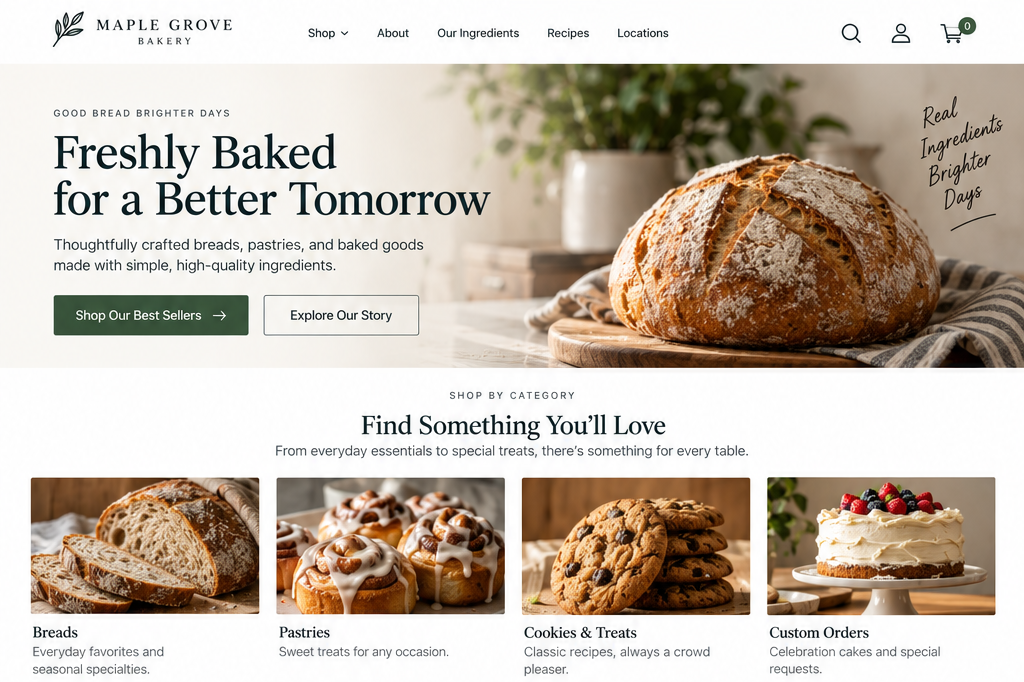
Homepage Navigation and Calls to Action
Can visitors quickly identify where to start and what to do next based on what they want to accomplish?
A visitor might understand what your business offers and understand its relevance, but still not know what to do next.
Your homepage should help people move forward.
Not every visitor will take the same action. Someone ready to buy, book, or contact you needs a clear way to do that. Others who are still weighing their options may want to review your products, services, pricing, or examples of your work before deciding.
Your homepage should help visitors quickly understand three things:
Where can I start exploring?
What can I do if I’m not ready to make a decision yet?
What is the most important next step?
1. Provide clear starting points for exploration
UX Check: Does the homepage provide obvious starting points for visitors who want to explore what we offer?
Your homepage is often a starting point rather than a final destination. Visitors may need to explore your products, services, programs, resources, locations, pricing, or other information before deciding what to do.
Make it easy for visitors to find those paths.
For a service business, that might mean introducing your main services and providing links to their individual pages.
An e-commerce business might provide clear paths into its primary product categories.
A nonprofit might direct visitors toward its programs, resources, volunteer opportunities, or ways to contribute.
You don’t need to link to every page on your website. Focus on the destinations that help visitors take the next logical step from where they are.
Your main navigation matters, but don’t expect visitors to always use it to find their way. The homepage should also offer clear paths to deeper information.
If you introduce a service, provide a way to explore that service. If you feature a product category, make it easy to browse that category. If you explain a program, link to more information about participating.
Calls to action should make it clear where the visitor will go next. For example, Explore Our Services is more helpful than a generic Learn More, especially if the context isn’t obvious.
2. Support Visitors with different levels of certainty and Intent
UX Check: Can visitors continue even if they aren’t ready to take our highest-commitment action?
Not everyone arrives on your homepage knowing exactly what they want or feeling ready to act.
One visitor may already know what they need and be ready to buy, book, contact you, or get started.
Another may be comparing several options.
Someone else may have only recently discovered your business and need more information before taking any meaningful action.
Consider a service business where the only prominent call to action is: Schedule a Consultation.
That works for someone who already knows they want the service. For others who are still learning about your services, process, or pricing, it can feel like too much too soon.
Offering another option, like Explore Services, lets visitors keep moving forward without asking for a commitment before they’re ready.
The same principle applies to other websites. An e-commerce visitor might want to browse categories before choosing a product. A nonprofit visitor may want to learn about its work before donating. A software buyer may want to explore features or pricing before requesting a demo.
Supporting different levels of intent doesn’t mean adding a button for every possible action. Consider what visitors are likely to need next and offer a few clear options. Too many choices can make it harder, not easier, for people to decide what to do.
3. Provide a clear and focused next step
UX Check: Is the most important next step obvious without competing with too many other calls to action?
While visitors may need different paths, your homepage should still make the most important next step clear. This is where prioritizing your calls to action makes a difference.
A primary call to action (CTA) represents the action you most want visitors to take. Secondary actions can provide other useful paths without competing equally for attention.
For example:
Primary: Schedule a Consultation
Secondary: Explore Services
Or:
Primary: Shop New Arrivals
Secondary: Browse All Collections
The appropriate hierarchy depends on your business and what visitors need before taking action.
Visual design can reinforce this hierarchy. Your primary action should stand out, while secondary actions stay available without competing for attention. Place calls to action where they fit naturally with the content visitors are reviewing.
When visitors reach the end of your homepage, make sure they have a clear next step. Don’t leave them at a dead end or force them to scroll back up to decide what to do.
Give visitors somewhere useful to go
A homepage shouldn’t force every visitor toward the same destination.
Some visitors need to explore.
Some need more information.
Others are ready to act.
Your homepage should account for those differences and still give visitors clear direction. Offer clear starting points for exploration. Provide paths for visitors at different stages of certainty and intent. Make the most important next step easy to spot.
When visitors quickly understand where they can go and what to do next, they don’t have to work out your website’s structure on their own. Your homepage helps them continue.
Review your website experience
Your homepage is just one part of the experience visitors have with your website.
The Website Experience Snapshot is a free resource that helps you evaluate nine areas of your website—from your homepage and navigation to conversion, mobile, accessibility, and the overall site experience. Use it to spot where visitors may be running into friction and where improvements could make the biggest difference.