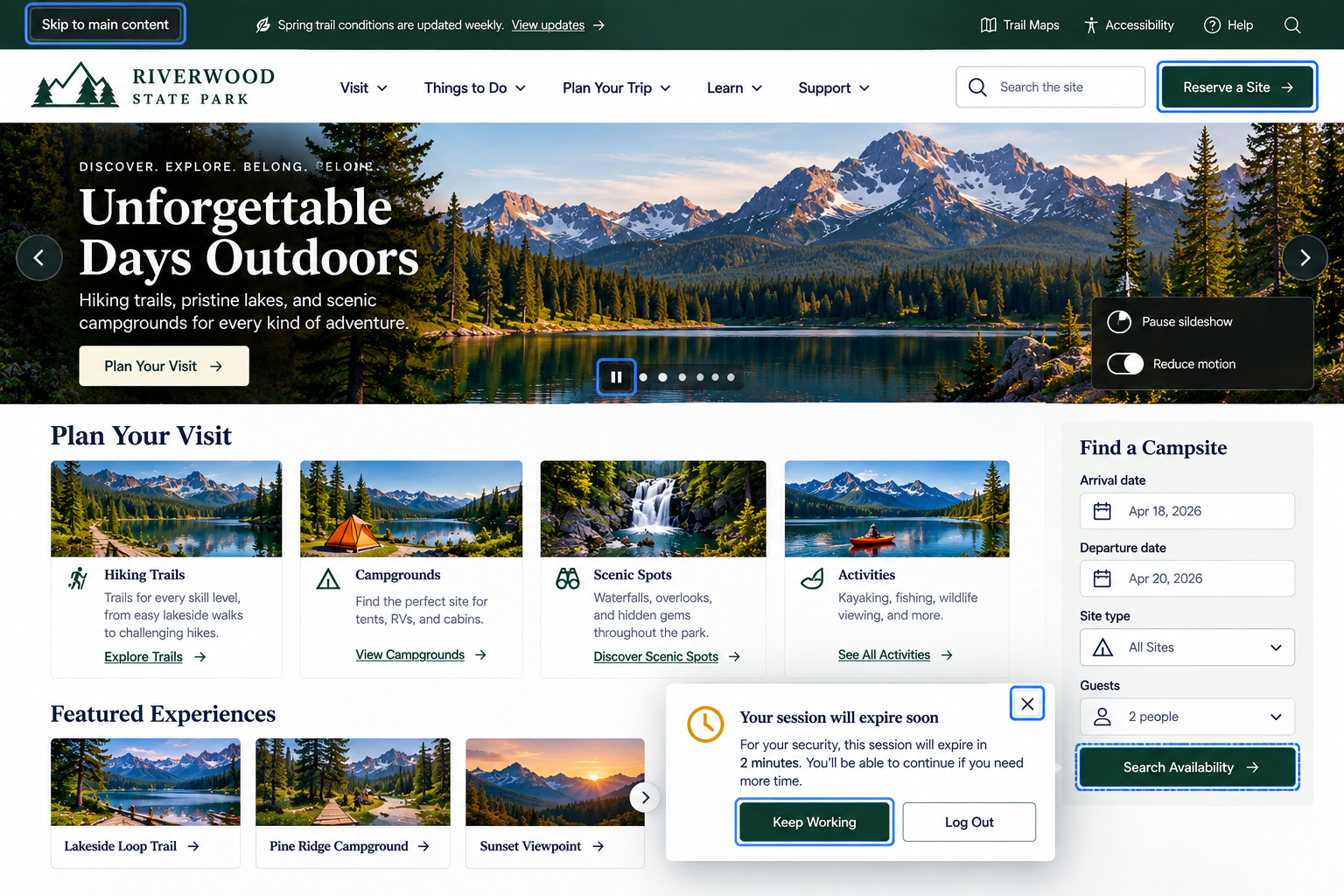
Making Your Website Easier to Navigate and Use
Can visitors navigate, interact with, and complete important tasks using a keyboard or other assistive methods, with clear focus and appropriate control over motion and timing?
Using a website often involves more than reading what’s on the page. Visitors open menus, follow links, complete forms, select options, dismiss popups, play videos, move through checkout, and perform many other interactions.
A good website doesn’t assume everyone interacts in the same way.
Some visitors navigate with a keyboard rather than a mouse. Others use assistive technologies or alternative input devices. Some need additional time to complete tasks. Others may be affected by unexpected movement or flashing content.
Your website should help ensure that visitors can:
Reach and use important functionality without relying on a mouse
Tell where they are as they move through interactive elements
Skip repetitive content when navigating through a page
Control movement and timing that could interfere with using the website
1. Make essential functionality fully keyboard accessible
UX Check: Can visitors access and use the website’s important functionality without a mouse or touchscreen?
Visitors using a keyboard should be able to reach and operate links, buttons, menus, forms, dialogs, filters, media controls, and other important interactive elements.
Test the website using only the keyboard, paying particular attention to custom controls and functionality designed around mouse interactions such as hover.
Keyboard accessibility isn’t just about navigating the page. Visitors should be able to complete the same important tasks, including forms, checkout, and booking.
2. Provide visible focus and a logical navigation order
UX Check: When someone navigates with a keyboard, can they tell where they are and does the focus move through the page in a sensible order?
Keyboard users need to see which interactive element currently has focus. Use a visible focus indicator, such as an outline, border, or background change, that stands out against the surrounding content.
Focus should also move through the page in a logical order that matches the content and interface.
Pay particular attention to menus, overlays, and dialogs. When they open, focus should move into them appropriately and return to a sensible location when they close.
3. Provide a way to bypass repetitive content
UX Check: Can visitors who navigate sequentially get past repeated content without moving through it every time?
Keyboard users may have to move through the same header, navigation, and other repeated controls on every page before reaching the main content.
Provide a Skip to main content link so visitors can bypass repeated navigation and move directly to the page’s primary content. This link can become visible when it receives keyboard focus.
Consider similar shortcuts for other large, repetitive areas when appropriate.
4. Give visitors control over moving, timed, or potentially harmful motion
UX Check: Can visitors pause, stop, avoid, or control movement and timing that could interfere with using the website?
Moving or automatically updating content can make a website harder to use. When appropriate, give visitors a way to pause or stop carousels, animations, videos, and other moving content, and respect reduced-motion preferences.
Be especially cautious with flashing or rapidly changing content, which can create serious accessibility risks.
For timed sessions, forms, reservations, or other tasks, warn visitors before time expires and provide a reasonable way to continue when possible. Movement and timing shouldn’t prevent visitors from accessing content or completing important tasks.
Make important interactions available to more people
Accessibility isn’t only about whether visitors can access your content. They also need to be able to use your website.
Make sure important features work without a mouse, keyboard focus is visible and follows a logical order, repetitive content can be skipped, and unnecessary movement or time limits don’t interfere with completing a task.
Visitors may navigate and interact with your website in different ways. The experience should still allow them to find information and complete important tasks.
Review your website experience
Your homepage is just one part of the experience visitors have with your website.
The Website Experience Snapshot is a free resource that helps you evaluate across nine areas of your website—from your homepage and navigation to conversion, mobile, accessibility, and the overall site experience. Use it to spot where visitors may be running into friction and where improvements could make the biggest difference.