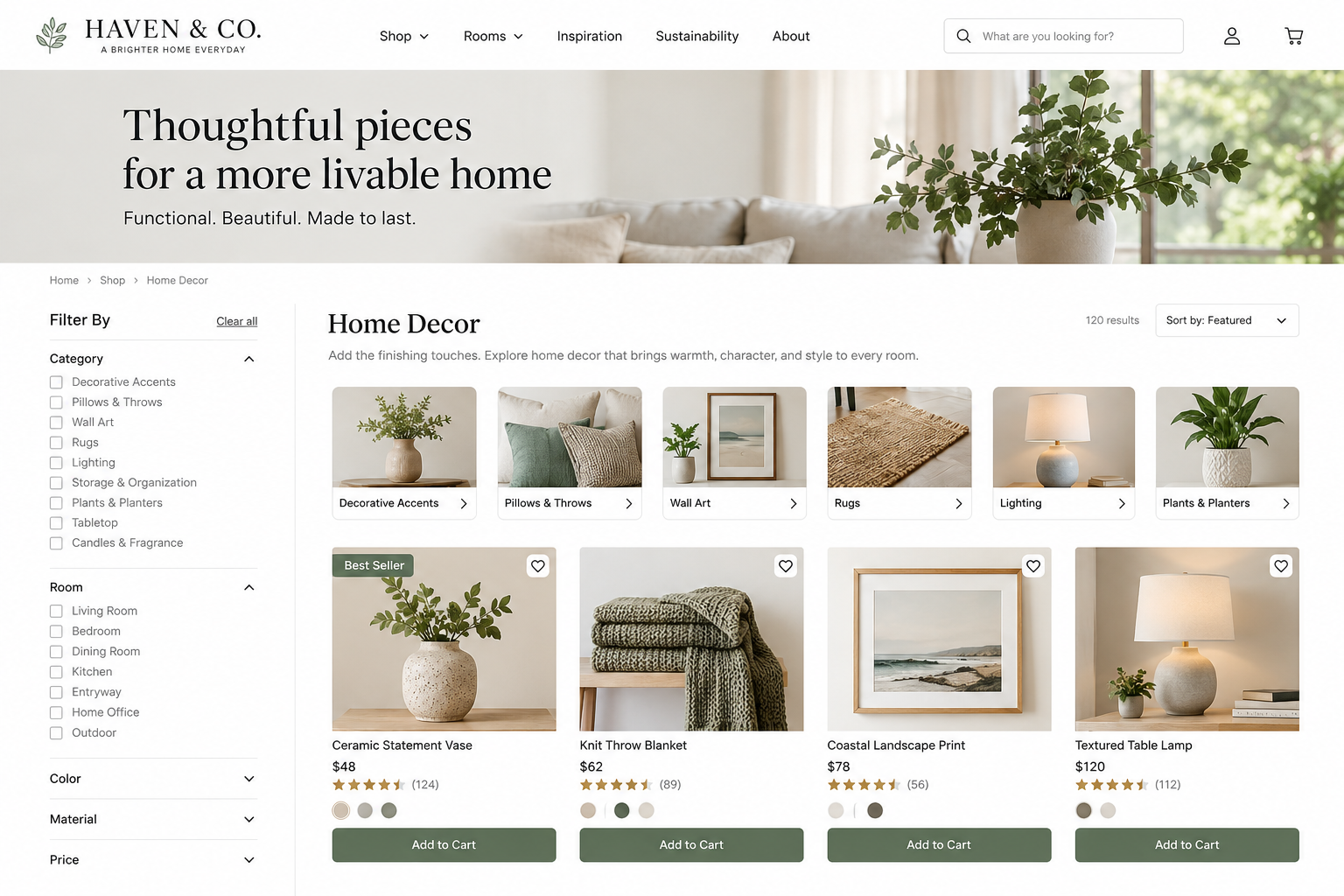
Offer Discovery UX Best Practices
An effective offer-discovery experience helps visitors find, explore, narrow, and compare relevant products or services, whether they know exactly what they need or are still considering their options.
Visitors should be able to find relevant products or services, even if they are unsure of what they need, the terminology, or where to start.
Some visitors know exactly what they want, while others are still exploring their needs or options. An effective offer-discovery experience supports both by helping visitors find, narrow, and compare choices before reaching a specific product or service page.
Consider these six UX best practices when evaluating how visitors discover your offerings.
________________________
1. Give Visitors More Than One Effective Discovery Path
UX Check: Can visitors find a relevant offering whether they know exactly what they want or are still exploring?
People search for products and services in different ways. Some use navigation or search, while others browse categories, follow links from educational content, explore by need, or use guides and recommendation tools.
Useful discovery paths may include:
Navigation and clearly labeled categories
Product or service listings
Site search
Links from relevant articles and resources
“Explore by goal” or “Find the right service” pathways
Related offerings
Comparison or selection tools
These paths should align with how visitors think about their needs, not just how your organization structures its offerings.
If one method is not effective, visitors should have alternative ways to continue.
2. Support Visitors Who Are Still Exploring
UX Check: Can visitors make progress if they know their goal but are unsure which offering will help?
Not everyone arrives knowing your terminology or the exact product, plan, package, or service they need.
Someone may look for “improve my website” rather than “UX audit,” “conversion optimization,” or “content strategy.”
Help exploratory visitors begin with concepts they understand, such as:
Goal or outcome
Problem to solve
Audience or use case
Budget or timeline
Location or availability
“Not sure where to start?” guidance
Plain-language, problem-based starting points help visitors move from asking “What are my options?” to identifying a smaller set of relevant choices.
3. Make Search Useful and Forgiving
UX Check: If visitors use search, can they find useful results without knowing your exact terminology?
Search becomes more important as your offerings increase in number and complexity.
A useful search experience recognizes the language visitors naturally use, including partial names, synonyms, problem-based searches, natural-language queries, and common misspellings.
Someone searching for “website review,” “site audit,” “UX assessment,” or “why isn’t my website converting?” may be looking for related help.
Search results should surface relevant offerings and, when useful, supporting content that helps visitors understand their options.
When there are few or no results, offer alternative paths such as related searches, categories, offerings, resources, or support, rather than leaving visitors at a dead end.
4. Make Listings Easy to Scan and Evaluate
UX Check: Can visitors identify promising options without opening every individual product or service page?
Listing pages should do more than display options; they should help visitors identify which options merit closer attention.
Provide enough information to explain what each option is, who it is for, and how it differs from alternatives.
Depending on the offering, that may include:
A clear name and concise description
Intended audience or use case
Key features or differentiators
Price or pricing model
Availability or timeline
Format, size, duration, or scope
Relevant proof points
A meaningful image or visual
Present consistent information across comparable options so visitors can easily scan and compare them.
If factors like price, availability, eligibility, or service area affect an option’s viability, communicate them early.
5. Help Visitors Narrow and Compare Options
UX Check: When visitors face many choices, can they efficiently identify the options that best fit their needs?
Filters and sorting make large collections easier to manage when they reflect how visitors make decisions.
Depending on the offering, useful filters might include category, price, audience, goal, features, availability, location, format, or eligibility.
Ensure active filters are easy to understand and adjust, and use sorting options that are meaningful to visitors.
When offerings are similar, highlight important differences such as price, features, audience, timeline, availability, level of support, or requirements.
For more considered decisions, saved items, shortlists, or comparison tools can help visitors keep track of promising options.
6. Preserve Context and Help Visitors Recover
UX Check: Can visitors explore options without losing the work they have already done?
Discovery often involves moving back and forth between listings and individual options.
When visitors return to a listing, preserve useful context such as their search query, filters, sort order, browsing position, or saved options whenever possible.
Avoid requiring visitors to rebuild the same search after viewing an individual offering.
If visitors reach a dead end, such as no search results, an unavailable offering, or overly restrictive filters, help them recover by providing relevant alternatives or a clear next step.
The goal is to keep visitors moving until they find a suitable option.
________________________
A Better Offer-Discovery Experience
A strong offer-discovery experience helps visitors answer three questions:
What options are available?
Which options may fit my needs?
How do the promising options differ?
Navigation, search, categories, listings, filters, comparison tools, and related content should work together to support this process.
When these elements work together, visitors spend less time searching and more time evaluating the most relevant products or services.
The individual offer page then has a different job: helping visitors understand a specific product or service well enough to decide whether to move forward.
Next steps
If visitors struggle to find your products or services, narrow their choices, compare options, or return to useful results, your website may be creating unnecessary discovery friction.
Fegan Consulting evaluates how visitors discover and compare products and services from an expert, accessibility-focused UX perspective. You receive prioritized recommendations to make your offerings easier to find and evaluate, without defaulting to a costly redesign.
Review your website experience
Your homepage is just one part of the experience visitors have with your website.
The Website Experience Snapshot is a free resource that helps you evaluate across nine areas of your website—from your homepage and navigation to conversion, mobile, accessibility, and the overall site experience. Use it to spot where visitors may be running into friction and where improvements could make the biggest difference.