Post-Conversion UX Best Practices
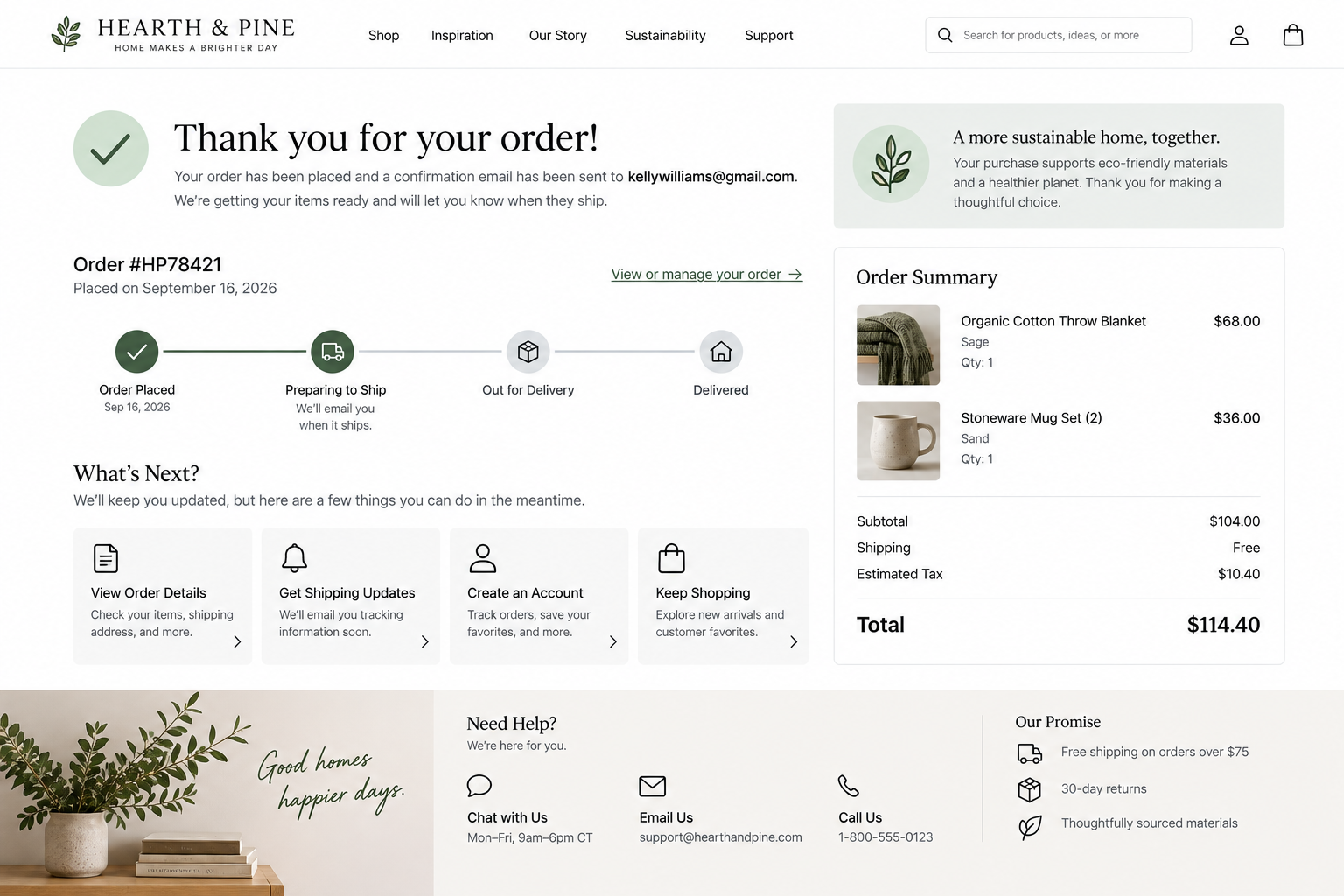
An effective post-conversion experience reduces uncertainty by confirming success, explaining what happens next, providing timely updates, and making support and account management easy to access.
Conversion is just one step in the customer journey. After completing an action, customers should receive confirmation, understand next steps, and know how to access support if needed.
A strong post-conversion experience reduces uncertainty by providing clear confirmation, timely updates, accessible support, and tools for managing purchases, bookings, requests, or submissions.
Consider these six UX best practices when evaluating your website’s post-conversion experience.
________________________
1. Clearly Confirm Completion
UX Check: After completing an action, can visitors immediately and confidently tell it was successful?
Provide clear, immediate confirmation of successful completion.
Replace generic messages like “Thank you” with specific explanations of what occurred:
Your order has been placed.
Your appointment is confirmed.
Your request has been submitted.
Your application has been received.
Your payment was successful.
When appropriate, include a summary with key details such as the selected product or service, date, amount paid, confirmation number, or other relevant information.
Customers should not need to check their email or question whether they must repeat the action.
2. Explain What Happens Next
UX Check: Do customers know what will happen, when it will happen, and whether they need to do anything?
Confirmation should not only acknowledge completion but also set clear expectations for next steps.
Avoid vague statements like “We’ll be in touch soon.” Provide specific information:
“We’ll review your request and respond within two business days.”
“Your order will ship within two business days. We’ll email tracking information when it ships.”
If further action is required, clearly explain what customers need to do and by when.
When helpful, provide a record customers can save or revisit, such as a receipt, booking confirmation, order summary, calendar invitation, or account link.
3. Send Useful Confirmation and Status Updates
UX Check: Do customers receive the information they need after they leave the website?
Many transactions require follow-up communication beyond the confirmation page.
Emails, text messages, receipts, calendar invitations, invoices, and tracking notifications should provide information customers can reference later.
Include relevant details such as what was completed, confirmation information, dates or delivery details, next steps, and instructions for making changes or seeking help.
If something changes, communicate promptly. Explain what changed, its impact, and any required customer actions.
Customers should not need to repeatedly check the website or contact support to learn about significant delays or changes.
4. Make Changes and Support Easy
UX Check: After conversion, can customers quickly find help or make necessary changes?
Customers may need to modify a booking, cancel an order, reschedule an appointment, update information, request a refund, change a subscription, or ask a question.
When changes are permitted, make the process straightforward. Clearly explain what can be changed, any deadlines or fees, and what happens after submitting a request.
Do not make cancellations or modifications significantly more difficult than the original conversion.
Support should be easy to find from confirmation pages, messages, account areas, and relevant website navigation.
If self-service is unavailable, provide a clear method for contacting the appropriate support team.
5. Respect Communication Preferences
UX Check: Are post-conversion messages useful, expected, and aligned with customer preferences?
Transactional messages about purchases, bookings, requests, billing, security, delivery, or important changes serve a different purpose from promotional marketing.
Keep transactional and promotional messages clearly distinct.
Do not hide marketing opt-ins within essential confirmations or make promotional communication seem mandatory.
When customers have communication options, explain their choices and make preferences easy to manage.
Customers who opt out of promotional messages should still receive essential transactional information.
6. Make Accounts Useful and Easy to Manage
UX Check: If customers return later, can they easily access and manage important tasks?
Accounts should simplify the ongoing customer relationship, not create additional obstacles.
Ensure sign-in is easy to find and organize account areas around common customer tasks, such as:
Viewing orders, bookings, or requests
Checking status and next steps
Managing upcoming appointments or payments
Accessing past transactions or documents
Updating account information or preferences
Finding support
Use clear labels and recognizable statuses instead of organizing account areas by internal structure.
Authentication should match the task. Protect sensitive information without creating unnecessary barriers for routine activities.e and usable, including alternatives when cognitive-function tests would otherwise be required.
________________________
A Better Post-Conversion Experience
A strong post-conversion experience guides customers through a clear sequence:
I completed the action
I know it worked
I understand what happens next
I can manage changes or get help
I can return when I need to
Confirmation pages, communications, status updates, self-service options, support, and account tools should work together to simplify the ongoing experience.
When these elements work together, customers spend less time seeking confirmation, waiting for information, contacting support, or managing completed actions.
Next steps
If customers are unsure an action succeeded, do not know what happens next, receive vague or delayed updates, struggle to make changes, cannot find support, or have difficulty managing their account, your post-conversion experience may be causing unnecessary friction.
Fegan Consulting evaluates confirmation experiences, customer communications, status updates, self-service journeys, account access, and account management from an expert, accessibility-focused UX perspective. You receive prioritized recommendations for improving the post-conversion experience without defaulting to a costly redesign.
Review your website experience
Your homepage is just one part of the experience visitors have with your website.
The Website Experience Snapshot is a free resource that helps you evaluate across nine areas of your website—from your homepage and navigation to conversion, mobile, accessibility, and the overall site experience. Use it to spot where visitors may be running into friction and where improvements could make the biggest difference.