Exploring Products and Services
Can visitors explore different options and refine their search without losing their place or progress?
Just because a visitor finds a promising option doesn’t mean they’re ready to make a decision. Most people need time to explore their options. They may open several products, look at different services, change their search, adjust filters, compare possibilities, or return to something they saw earlier.
Your website should make exploration easier, not force visitors to repeat steps they’ve already taken.
Your website should help visitors:
Refine a search without unnecessarily starting over
Move between listings and details without losing their place
Browse additional options without disrupting what they’re doing
Understand which filters are affecting their results
Keep track of promising options when the decision takes time
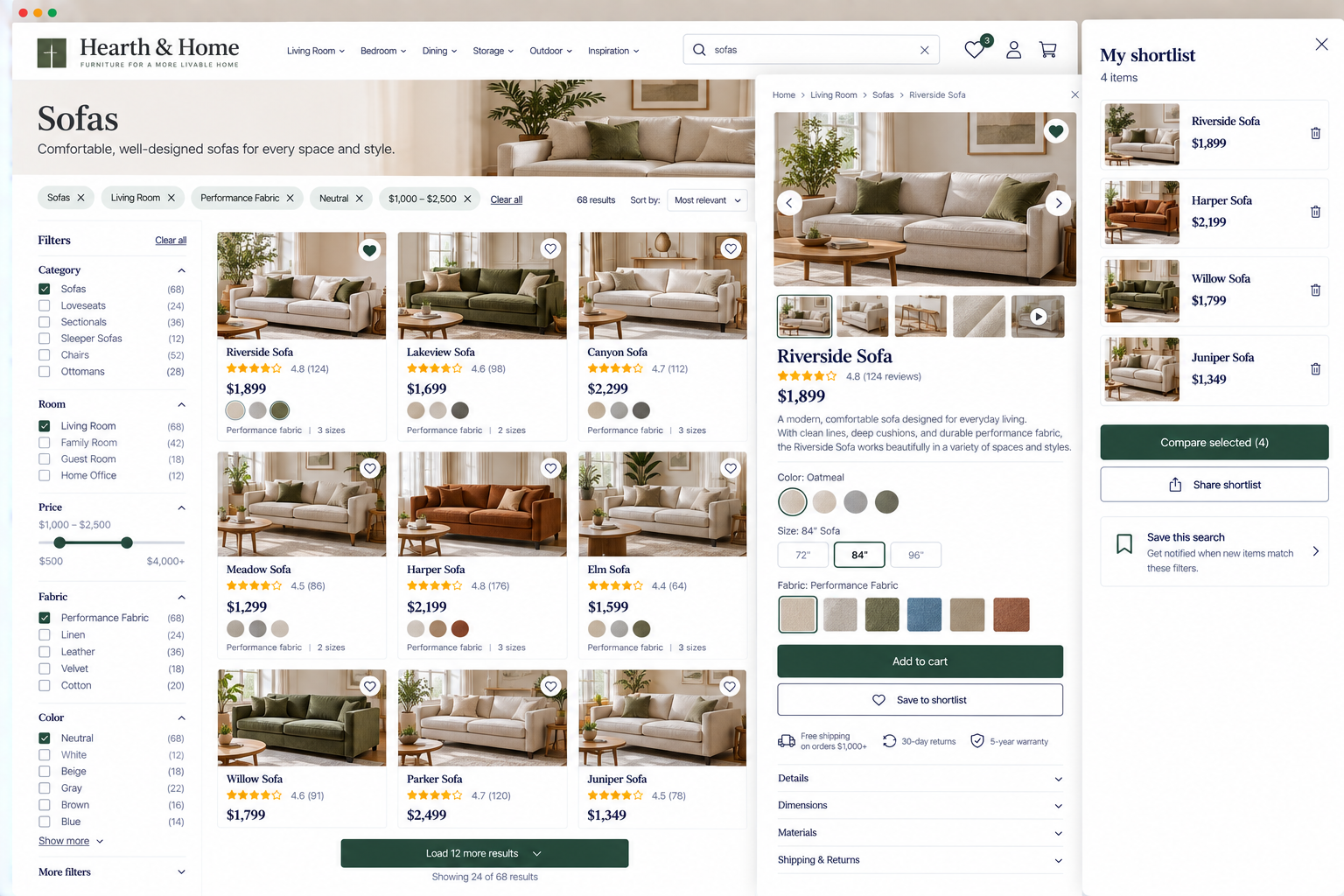
1. Preserve useful search context as visitors refine their search
UX Check: Can visitors adjust their search without unnecessarily losing useful context from what they’ve already done?
Search is often an iterative process. A visitor may start with a broad query, review the results, realize the wording isn’t quite right, and try something more specific.
Your website should make it simple for visitors to refine their search as they go.
Keep the current query visible and editable.
Preserve useful selections when they still apply.
Give visitors a way to modify what they’ve entered rather than forcing them to start from an empty search.
The goal is to let the search process evolve as visitors get clearer about what they need.
2. Preserve browsing context and position
UX Check: Can visitors open an option, review it, and return to where they left off?
A visitor might scroll through dozens of products, open one that looks promising, review its details, and then return to the list to keep exploring.
Visitors shouldn’t have to scroll back down and find their place every time they return to a list.
Preserve useful context such as scroll position, the current page of results, selected category, sort order, and other relevant browsing choices.
This becomes increasingly important as the number of options grows.
3. Load additional options without disrupting browsing
UX Check: When visitors view more options, can they continue exploring without losing their place or sense of progress?
Large collections usually can’t display every option at once. Websites may use pagination, Load More buttons, infinite scrolling, or other approaches to reveal additional results.
Whatever method you use to load more content, it should help visitors keep exploring instead of breaking their flow.
Previously loaded results should remain available when possible so visitors can continue exploring without retracing their steps.
4. Clearly communicate and preserve filtering state and impact
UX Check: Can visitors easily tell which filters are applied, how they’re affecting the results, and change them without starting over?
When visitors apply filters, make it clear which ones are active and how they affect the results.
Allow individual filters to be changed or removed without resetting other selections, and preserve filters when visitors view an option and return to the results.
Filtering should make exploring easier, not add extra steps visitors have to repeat.
5. Allow visitors to save or shortlist options when useful
UX Check: If visitors are likely to consider several options over time, can they easily keep track of the ones that interest them?
For decisions that take time or involve comparing several options, give visitors a way to keep track of what they’re considering.
Favorites, shortlists, wishlists, saved searches, or comparison tools can reduce the need to remember or rediscover options. Keep saving simple, avoid requiring an account when unnecessary, and preserve selections across visits when appropriate.
Saving isn’t needed for every website, but it can make complex decisions easier to manage.
Let visitors explore without making them start over
Exploring options isn’t always a straight path from a listing to a decision. Visitors may search, narrow, open an option, go back, change their criteria, look at something else, and revisit an earlier possibility. Your website should support that behavior.
Preserve useful search context. Keep visitors’ place as they browse. Load additional options without disrupting their progress. Make filtering state clear and persistent. And when the decision warrants it, give visitors a way to keep track of promising choices.
When visitors can move between options without having to redo their work, they spend more time evaluating choices and less time wrestling with the website.
Review your website experience
Exploring products and services is just one part of the experience visitors have with your website.
The Website Experience Snapshot is a free resource that helps you evaluate nine areas of your website—from your homepage and navigation to conversion, mobile, accessibility, and the overall site experience. Use it to spot where visitors may be running into friction and where improvements could make the biggest difference.