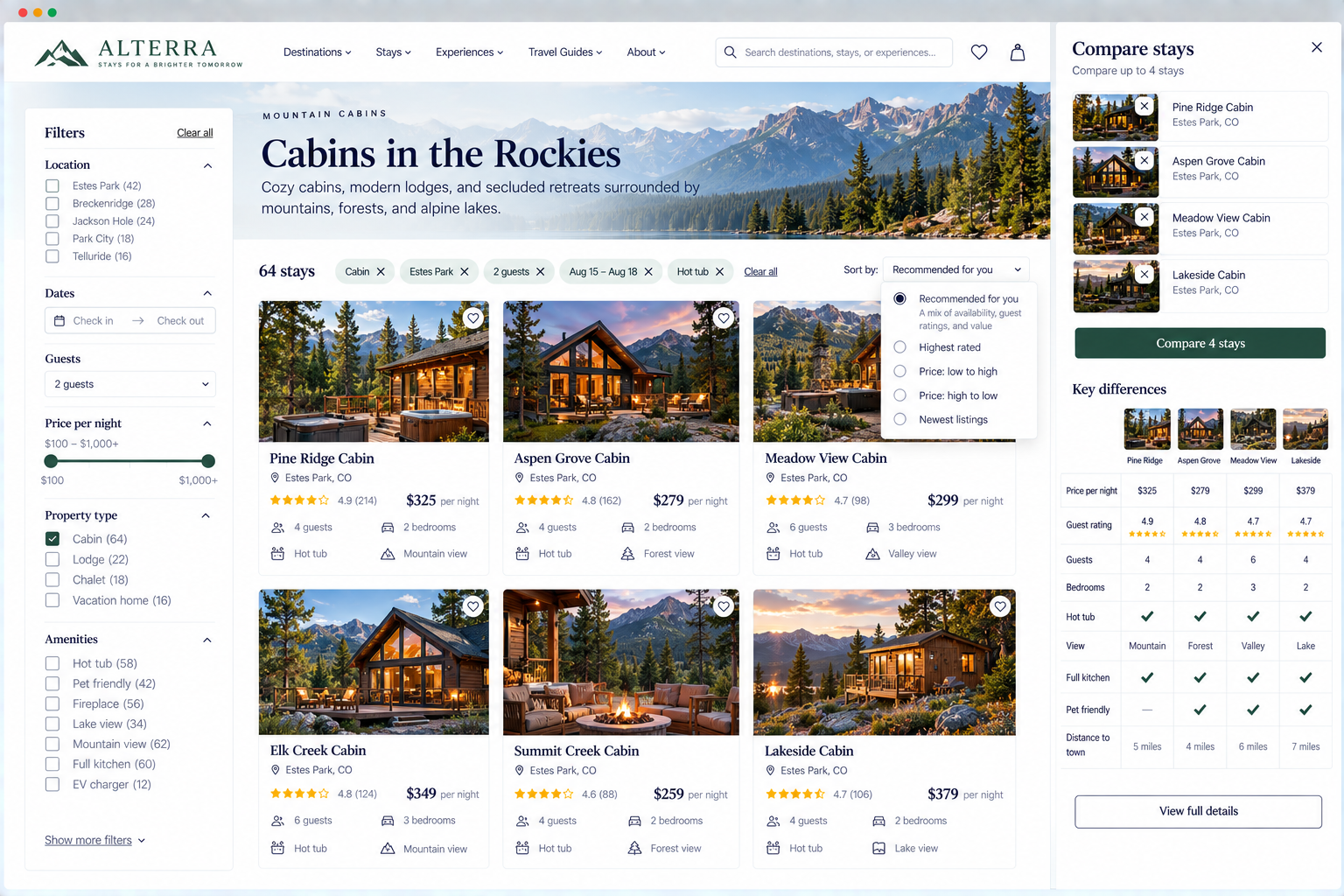
Product Filtering
Can visitors easily scan, compare, and narrow offerings based on their needs?
Finding your products or services is only the beginning. Once visitors see what’s available, they need to figure out which options are relevant to them.
It’s straightforward when there are only a few choices. But if your website offers dozens, hundreds, or even thousands of products, or several services that seem similar, visitors often need support to narrow things down.
How you present options makes a difference. Useful details, practical filters, clear sorting, and visible differences between offerings help visitors move from a long list to a manageable decision.
Your website should help visitors answer questions such as:
Which options might fit my needs?
What’s the difference between them?
How can I narrow this list?
Which criteria should I use to compare my options?
1. Use a listing format suited to the offering and decision
UX Check: Does the way we present our options make it easy for visitors to evaluate what matters?
There isn’t one right way to display products or services. Image-led grids work well when appearance matters, while lists or tables may be better for scanning details or comparing options.
Think about what visitors need to know before choosing an option.
If appearance is important, imagery may deserve more prominence. If price, location, availability, specifications, or features drive the decision, those details may need more space.
2. Provide enough consistent information to evaluate and compare listing options
UX Check: Can visitors evaluate several options without opening every individual page?
Listing pages should give visitors enough information to decide which options deserve a closer look.
Include the details most relevant to the offering, such as price, availability, location, ratings, or key differences. Keep this information consistent across listings so options are easy to compare.
Visitors don’t need every detail—just enough to decide what to explore further.
3. Make individual listing options easy to distinguish
UX Check: Can visitors quickly tell one option from another?
When several offerings appear together, visitors should be able to understand how they differ.
Generic names like Essential, Premium, and Complete may suggest a hierarchy but These names hint at a hierarchy, but they don’t explain who each package is for or what sets them apart. Add brief supporting information that highlights the key differences, such as audience, use case, or level of support.
Give visitors enough information to understand why one option might be a better fit than another.
4. Use meaningful and accurate listing visuals
UX Check: Do listing images help visitors understand and distinguish their options?
Images often play an important role in how visitors scan listings. Choose visuals that accurately represent the option.
If listings use the same stock image, visitors get little value from them. Inconsistent angles, backgrounds, or scales in product images also make comparison more difficult.
Images do not need to match exactly, but they should make evaluation easier, not harder.
If the offering is not visual by nature, it’s better to focus on useful information instead of adding images just to fill space.
5. Communicate important pricing and availability information early
UX Check: Can visitors see important price or availability information before investing time in an option?
Price and availability can quickly determine whether an option is relevant.
There may be legitimate reasons why exact pricing or availability can’t be shown immediately.
In those cases, share whatever helpful details you can, such as a starting price, a price range, availability status, or an explanation of how pricing works.
Make it easy for visitors to rule options in or out before they spend more time.
6. Group closely related variations appropriately
UX Check: Are closely related variations presented in a way that helps rather than overwhelms visitors?
You do not need to show every variation as a separate option. Grouping those variations under one product may make the selection easier to understand.
The same principle can apply to sizes, configurations, locations, service levels, dates, or other closely related variations.
At the same time, avoid grouping options that are truly different just because they are related.
The question is whether visitors think of the choices as different offerings or variations of the same offering.
Organize options based on how visitors understands the differences.
7. Provide meaningful and discoverable filters
UX Check: Can visitors easily narrow their options using criteria that matter to their decision?
Filters are most useful when they reflect how visitors actually choose. Focus on the criteria that meaningfully reduce the options.
A clothing retailer might offer filters for size, category, color, price, and fit. A real estate website might use location, price, number of bedrooms, and property type. A directory of healthcare providers might include specialty, location, insurance, and appointment availability.
The best filters reflect the decisions visitors need to make, not just the data your system tracks.
They also need to be easy to find. If filtering matters for navigating a large selection, visitors shouldn’t have to search for the controls.
8. Make filter options clear and support useful combinations
UX Check: Can visitors understand what each filter means and combine criteria in ways that match their needs?
Filters often work together. Someone shopping for shoes may want Women’s + Size 9 + Running + Less Than $150 rather than choosing only one criterion.
Allow combinations that reflect realistic decisions.
Filter labels should also be understandable. Internal product attributes, abbreviations, or technical terminology may be meaningful to your organization while confusing visitors.
When filters are in use, show the current selections so visitors know why they are seeing certain results.
Visitors should be able to change or remove filters without starting from scratch.
9. Make large filter sets manageable
UX Check: If we offer many filters, can visitors find and use the ones that matter without becoming overwhelmed?
More filters aren’t always more helpful. Large catalogs may need many ways to narrow results, but showing every filter at once can overwhelm visitors and make it harder to browse the products themselves.
Prioritize commonly useful criteria. The number and complexity of filters should reflect the decisions visitors actually need to make.
Focus on attributes that actually help visitors make a choice, rather than making them sort through dozens that rarely matter.
10. Provide meaningful sorting with a useful default
UX Check: Can visitors reorder their options in useful ways, and does the default order make sense?
Sorting helps visitors change the perspective on a set of results based on criteria that matter, such as price, rating, popularity, or recency.
The useful options depend on what visitors are evaluating. Offer sorting options that help visitors make decisions, not just more ways to reorder the list.
If you use terms like Featured, Recommended, or Best Match, make it clear what those mean so visitors understand how results are ordered.
A useful default should surface options that are reasonably likely to help most visitors begin evaluating the list.
11. Help visitors compare meaningful differences
UX Check: Can visitors easily compare the differences that are most likely to influence their decision?
Some decisions require more than scanning a list. When offerings are similar or complex, visitors may need to compare several options more directly.
Use tables, side-by-side details, or consistent listing information to highlight meaningful differences such as features, scope, audience, timeline, or support.
A comparison is only helpful if it highlights what matters. Too much information or too many small differences can hide the important points.
The goal is to help visitors understand what is different and why that difference might matter to them.
Help visitors move from many options to the right ones
A large selection can be valuable, but only if visitors can make sense of it. They shouldn’t have to inspect every offering individually or already know exactly which option they need.
Present listings to support decision-making. Offer enough consistent information for visitors to evaluate their choices. Highlight important differences. Use filters and sorting when there are many options, and make comparison easier when choices are similar.
When visitors can quickly understand which options fit their needs and which ones don’t, a long list becomes a manageable decision.
Review your website experience
Narrowing down products and services is just one part of the experience visitors have with your website.
The Website Experience Snapshot is a free resource that helps you evaluate nine areas of your website—from your homepage and navigation to conversion, mobile, accessibility, and the overall site experience. Use it to spot where visitors may be running into friction and where improvements could make the biggest difference.