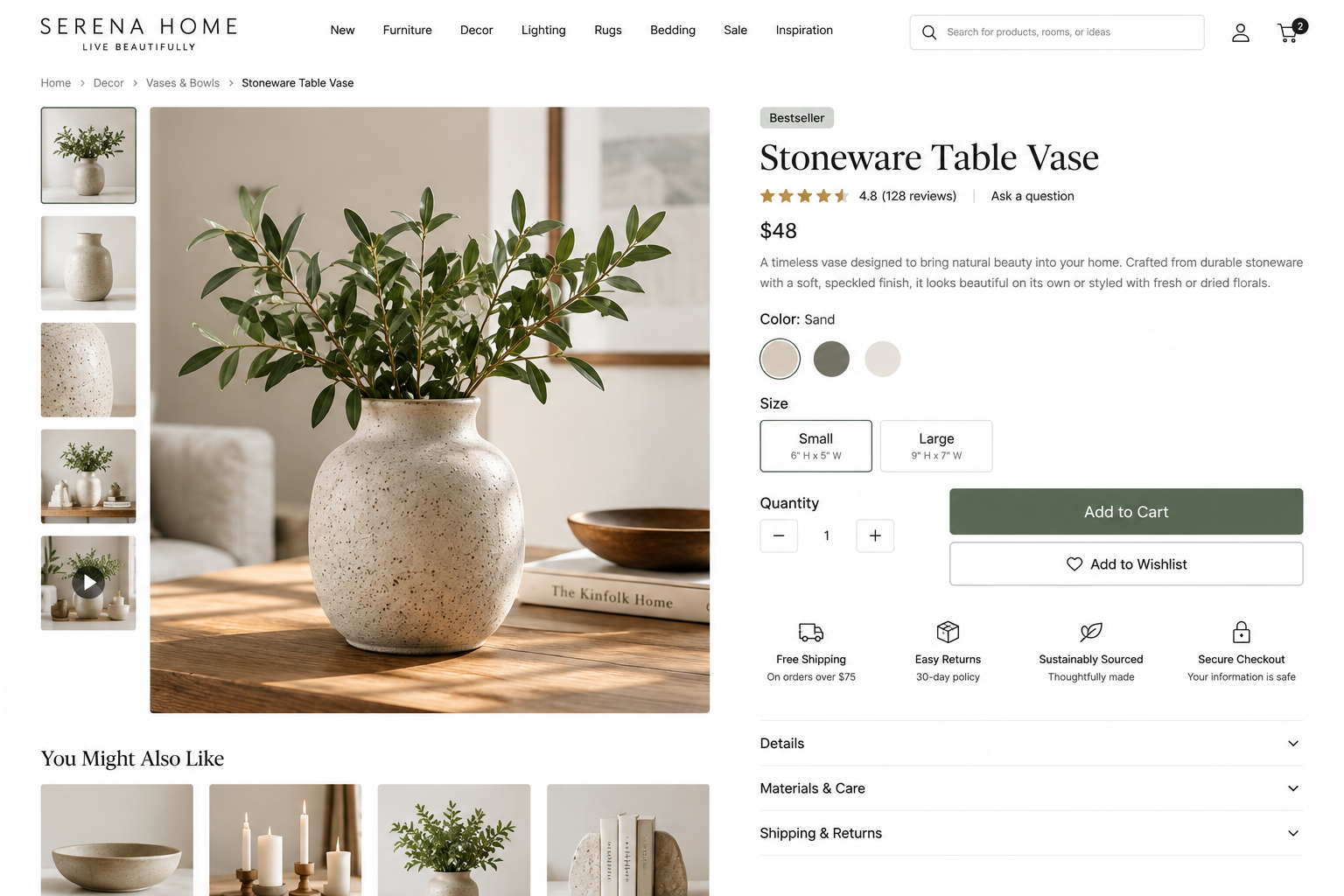
Product & Service Detail Page UX Best Practices
An effective product or service detail page helps visitors understand the offering, determine whether it meets their needs, find essential information, and confidently decide what to do next.
When visitors arrive on a product or service detail page, they should quickly understand what the offering is, whether it meets their needs, its cost, what to expect, and the next steps.
An effective product and service detail page delivers the practical information and evidence visitors need to evaluate an offering, without requiring them to search multiple pages or rely on vague marketing claims.
Consider these eight UX best practices when reviewing your product and service detail pages.
________________________
1. Clearly Explain What the Offering Is and Why It Matters
UX Check: Can visitors quickly understand what the offering is, who it is for, and why they should choose it?
At the top of the page, clearly explain the product or service, its intended audience, the problem or goal it addresses, and what visitors can expect.
Avoid vague headlines or internal terminology that require visitors to interpret the basics.
Explain what the offering is and why it is valuable. When relevant, clarify how it differs from alternatives and specify the situations, audiences, or needs it best serves.
Use persuasive language to communicate benefits, but support them with practical information so visitors fully understand the offering.
2. Present Decision-Critical Details Early
UX Check: Can visitors find the information that affects their decision before you ask them to take action?
Present key practical information early so visitors can determine if the offering fits their needs.
Depending on the offering, that may include:
What is included or excluded
Requirements or eligibility
Specifications or compatibility
Scope and deliverables
Timeline or process
Price or pricing model
Availability or lead time
Relevant policies
Do not require visitors to contact you for basic information they need to assess the offering’s suitability.
If details vary, explain what influences them and how visitors can obtain the necessary information.
3. Organize Information for Scanning and Understanding
UX Check: Can visitors quickly find and understand the information that matters to them?
Some visitors scan for key facts, while others seek a full understanding of the process, specifications, evidence, or answers to specific questions.
Use descriptive headings, logical groupings, concise paragraphs, lists, tables, and clear formatting to make important information easy to find.
For longer pages, in-page navigation, accordions, or other organizational tools can help. However, avoid hiding essential information behind multiple interactions.
If visitors need information to decide, ensure it is easy to find.
4. Make Scope, Selections, and Variations Clear
UX Check: Can visitors tell exactly what they are getting and make selections without uncertainty?
Clearly indicate what is included, optional, excluded, required, or compatible.
For products, this may include size, color, material, quantity, model, configuration, or subscription options. For services, it may include deliverables, timeline, revisions, communication methods, add-ons, or limitations.
When visitors can choose between variations, explain how each option affects price, availability, features, scope, or timing.
A visitor should be able to answer:
“What am I choosing?”
“What changes if I choose this option?”
“What will I receive?”
5. Use Visuals and Media to Support Evaluation
UX Check: Do the visuals help visitors understand the offering well enough to evaluate it?
Visuals should provide useful information rather than serve only to enhance the page’s appearance.
Depending on the offering, useful visuals might include product images, screenshots, sample deliverables, process diagrams, demonstrations, before-and-after examples, or realistic examples of the offering in use.
For example, a consultant might show a sample deliverable or simplified view of the review process rather than relying on a generic stock photo.
Ensure visuals and media are accessible, and help visitors understand meaningful differences when appearance, scale, format, or scope influence their choices.
6. Be Transparent About Price, Availability, and Policies
UX Check: Can visitors understand whether the offering fits their budget, timing, and practical constraints?
Price, availability, timing, and policies often determine whether visitors proceed. Provide this information before the conversion point.
If the price is fixed, state it clearly. If it varies, explain the reasons and factors affecting the final cost. When appropriate, provide a starting price, range, package comparison, or explain how visitors can request a quote.
Also communicate practical considerations such as additional costs, availability, timelines, cancellation terms, refunds, returns, or other relevant policies.
If an offering is unavailable, offer a useful alternative rather than leaving visitors at a dead end.
7. Build Confidence With Credible Evidence and Helpful Answers
UX Check: Does the page give visitors enough reason to trust the offering before asking them to act?
Support your claims with decision-relevant evidence, such as:
Reviews or testimonials
Case studies
Results or outcomes
Credentials or experience
Demonstrations or sample work
Third-party validation
Clear explanations of your process or standards
Evidence should provide meaningful context. For example, a testimonial describing the customer’s situation, their choice, and the outcome is more valuable than a generic statement like “Amazing service!”
Address common questions as well. FAQs can help, but they should support clear explanations throughout the page rather than replace them.
8. Keep Visitors Focused and Make the Next Step Clear
UX Check: Once visitors have enough information, is it obvious what they should do next?
Give each detail page a clear primary action that matches the offering and the visitor’s decision stage.
That might be:
Buy Now
Add to Cart
Choose a Plan
Request a Quote
Schedule a Consultation
Book an Appointment
Start a Trial
Join the Waitlist
Use specific labels that set expectations. For example, “Request a Website Review” communicates more than a generic “Get Started.”
Related products, services, resources, or alternatives can help visitors evaluate their options, but keep these secondary to the primary offering and action.
Make it easy for visitors to proceed without pressuring them to act before they have enough information.
________________________
A Better Product and Service Detail Page Experience
A strong detail page helps visitors answer a sequence of practical questions:
What is this?
Is it right for me?
What exactly do I get?
What does it cost?
Can I trust it?
What do I do next?
Clear messaging, practical details, useful visuals, transparent pricing, credible evidence, and a specific call to action should work together to support the visitor’s decision.
When these elements are clear and accessible, visitors spend less time searching for information and more time evaluating whether the offering meets their needs.
Next steps
If your product or service pages use vague marketing language, hide important details, make price or availability difficult to find, leave visitors uncertain about what is included, or lack a clear next step, they may create unnecessary friction.
Fegan Consulting evaluates product and service detail pages from an expert, accessibility-focused UX perspective. You receive prioritized recommendations to make your offerings easier to understand, evaluate, and act on, without defaulting to a costly redesign.
Review your website experience
Your homepage is just one part of the experience visitors have with your website.
The Website Experience Snapshot is a free resource that helps you evaluate across nine areas of your website—from your homepage and navigation to conversion, mobile, accessibility, and the overall site experience. Use it to spot where visitors may be running into friction and where improvements could make the biggest difference.