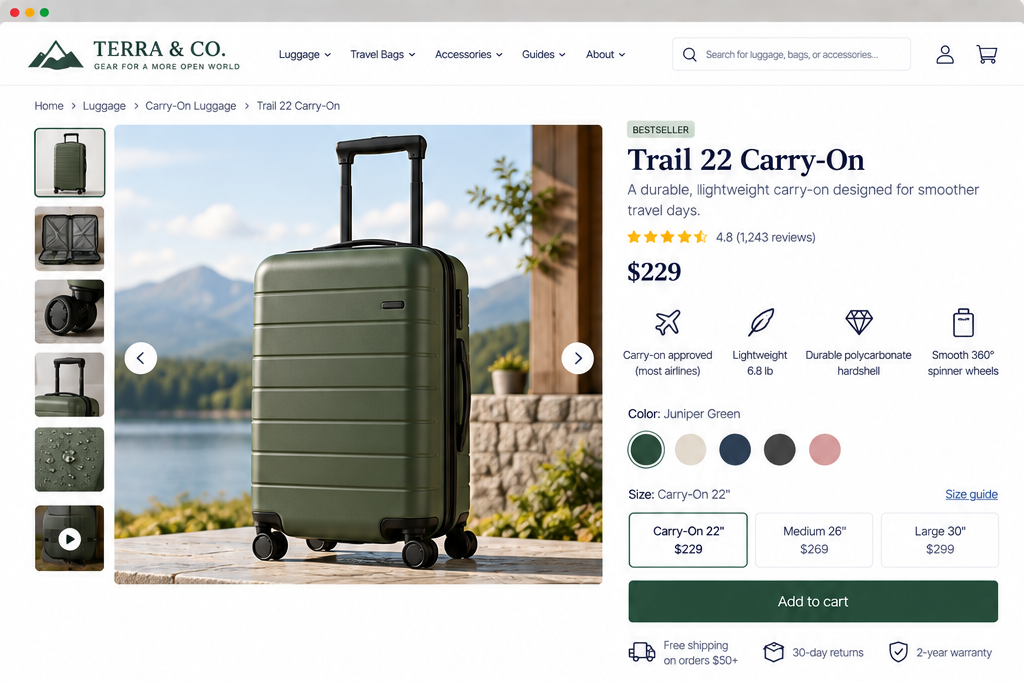
Product and Service Information
Can visitors quickly understand what the offering is, who it’s for, what’s included, and why it’s relevant?
Even if a visitor finds the right product or service, they may not be ready to decide. First, they need to understand what it is and how it helps them.
A product or service page should give visitors enough information to understand what the offering is, what it can help them accomplish, and whether it fits their needs.
This is often more challenging than it appears.
Many businesses rely on internal terms, marketing phrases, or long lists of features, often spreading key details across the page. This leaves visitors trying to figure out what’s actually being offered.
Your product or service pages should help visitors quickly understand:
What is this, and what does it help me do?
What makes it different or useful?
What do I actually get?
Are there any requirements, limitations, or exclusions I should know about?
1. Clearly communicate the offering, its value, and what differentiates it
UX Check: Can visitors quickly understand what this offering is, why it might be useful to them, and what makes it different?
Begin with the essentials. Someone landing on a product or service page shouldn’t have to read several sections before understanding what you’re offering.
A product detail page might clearly communicate the type of product, its primary purpose, and the features or qualities that make it useful.
A service detail page might explain what the service does, who it’s intended for, what problem it addresses, and the outcome it is designed to support.
Avoid broad marketing language that doesn’t explain the offering.
“A transformative solution designed to unlock your organization’s full potential “sounds appealing but says little about the service.
“A one-time website review that identifies usability issues and provides prioritized recommendations” gives visitors a much clearer idea of what to expect.
Differentiation matters too. If similar products or services exist, help visitors understand why they might choose this particular option. That difference might come from the intended audience, features, materials, process, level of support, expertise, scope, or another characteristic that genuinely affects the decision.
Don’t make visitors guess what makes the offering valuable.
2. Organize content for easy scanning, reading, and navigation
UX Check: Can visitors quickly find the information they need without reading the entire page from beginning to end?
Detail pages often need to communicate a lot of information. But most visitors won’t read every word.
People may scan for pricing, specifications, what’s included, sizing, process, availability, compatibility, FAQs, or another detail that matters to their particular decision.
Structure the page so important details are easy to find.
Use descriptive headings to break information into meaningful sections.
Keep related information together.
Use lists, tables, specifications, or other formats when they make information easier to understand.
Longer pages may benefit from links that help visitors move directly to important sections.
Prioritize the information most people need early while allowing visitors to explore greater detail as they continue. Don’t turn the page into a wall of marketing copy.
A well-structured page doesn’t need to be shorter. It just needs to make information easier to navigate.
3. Use collapsed and interactive content carefully
UX Check: Is important information easy to find even when we use accordions, tabs, expandable sections, or other interactive content?
Collapsed content can make a detailed page easier to scan.
An FAQ accordion, specification section, size guide, or expandable description can keep secondary information available without displaying everything at once.
However, hiding information can make it easy to miss.
Visitors may not open a section if its label doesn’t clearly communicate what it contains. They may not realize tabs contain additional information. Important details may effectively disappear when too much of the page is collapsed by default.
Think about the importance of the information before hiding it.
If a detail could affect someone’s decision—like major limitations, requirements, costs, or what’s included—keep it visible without extra clicks.
When you do use collapsed or interactive content, make the controls recognizable and the labels descriptive.
Visitors should be able to understand what information is available and how to access it.
4. Use plain language and balance persuasion with practical information
UX Check: Does the page explain the offering in language visitors can understand while giving them the practical information they need to evaluate it?
Product and service pages should inform as well as persuade.
A page filled with phrases such as industry-leading, best-in-class, revolutionary, or unmatched may communicate enthusiasm without helping someone understand what they’re actually considering.
Specific details are usually more helpful.
Instead of simply saying a product is high performance, explain the feature or specification that supports that claim.
Instead of describing a service as comprehensive, explain what the service covers.
Use terminology your visitors are likely to understand. If technical, industry-specific, or specialized language is necessary, provide enough context for people who may not already know it.
The goal isn’t to remove persuasive language. The goal is to ensure persuasion never replaces useful information.
Visitors should come away understanding the offering—not simply knowing that the business thinks highly of it.
5. Clearly explain what is included, excluded, required, and compatible
UX Check: Can visitors tell exactly what they’re getting and identify important limitations before they commit?
Many disappointing experiences begin with a mismatch between what someone thought they were getting and what the offering actually included.
Many disappointing experiences begin with a mismatch between what someone thought they were getting and what the offering actually included.
Set clear boundaries.
For a service, visitors may need to know: what work is included, what deliverables they’ll receive, what isn’t included, what they’ll need to provide, and what prerequisites or eligibility requirements apply.
For a product, they may need to know: what comes in the package, what is sold separately, which sizes or configurations are available, what devices, systems, or accessories it works with, and whether additional equipment or subscriptions are required.
Don’t expect visitors to figure out these details from images, product names, or marketing copy.
For example, if a pictured accessory isn’t included with the product, make that clear. If a service requires the customer to already have a particular platform or account, explain that before they purchase or inquire.
Don’t hide important exclusions or requirements in fine print just because they might seem less appealing.
When visitors know exactly what they’re getting, there’s less uncertainty and expectations are clearer.
Help visitors understand what they’re considering
A product or service page doesn’t need to answer every possible question immediately. It does need to give visitors an accurate foundation for evaluating the offering.
Be clear about what the offering is, what it helps someone do, and what sets it apart. Organize information so visitors can quickly find what matters. Use interactive content only when it doesn’t hide essential details. Use plain, specific language. Set clear boundaries for what’s included.
When visitors understand what they’re considering, why it might matter, and what they’ll actually get, they can decide whether it’s worth evaluating further.
Review your website experience
Your homepage is just one part of the experience visitors have with your website.
The Website Experience Snapshot is a free resource that helps you evaluate across nine areas of your website—from your homepage and navigation to conversion, mobile, accessibility, and the overall site experience. Use it to spot where visitors may be running into friction and where improvements could make the biggest difference.