Product and Service Decision Support
Can visitors easily find the key details and evidence they need to make a decision?
Knowing what a product or service is rarely gives someone enough to make a decision. People often need to know the price, how it works, what results to expect, whether it’s available, what others have experienced, and what happens if it doesn’t meet their needs.
The specific questions depend on the offering. Someone buying a pair of shoes needs different information than someone choosing an accountant, booking a hotel, purchasing software, or hiring a contractor. Your product and service pages need to focus on the information that helps someone decide.
Visitors should be able to answer questions like:
Does this meet my needs?
What will it cost me?
What can I realistically expect?
What evidence helps me feel confident about choosing it?
What questions do I still need answered before I act?
1. Present complete, decision-critical information early enough to support evaluation
UX Check: Can visitors find the information most likely to influence their decision before investing unnecessary time in the offering?
Not every detail needs to appear at the top of the page. But don’t hide information that could change someone’s mind at the bottom of the page, in an FAQ, or after they’ve started the purchase or inquiry process.
Think about what could change the decision.
For a product, that might include price, dimensions, materials, compatibility, availability, delivery timing, or an important feature.
For a service, it could include pricing, scope, process, timeline, eligibility, deliverables, or who the service is designed for.
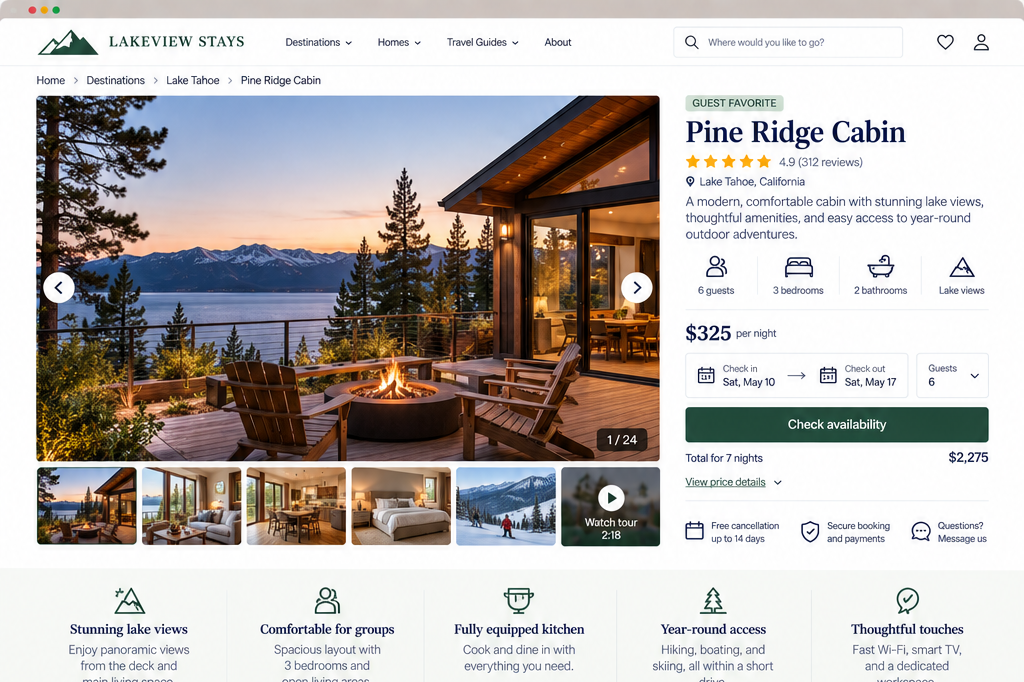
A vacation rental might need to surface location, occupancy, amenities, cancellation terms, and availability. A software product may need to explain supported platforms, key capabilities, pricing, and important limitations.
You don’t need to put every detail at the top.
The goal is to make sure visitors find the important information early enough to use it in their decision.
2. Use visuals and realistic context to support evaluation
UX Check: Do the visuals help visitors accurately understand what the offering looks like, how it works, or what they can expect?
Visuals often answer questions that words alone can’t.
For a physical product, visitors may need to see multiple angles, important details, scale, color, materials, or the product in use.
For a service, examples of work, sample deliverables, diagrams, screenshots, before-and-after examples, or other realistic representations may help make an intangible offering more concrete.
Context is important.
A photograph of a sofa against a white background helps visitors see the product. Showing that same sofa in a room may help them understand its scale and appearance in a realistic setting.
Similarly, telling someone they’ll receive a comprehensive report gives them less information than showing an example of what that report actually looks like.
It’s critical to set accurate expectations.
Be careful with images or examples that create an impression the actual offering can’t support. A visitor should not have to determine which parts of an image are included, whether an example represents typical work, or whether the result shown is realistic.
Use visuals to reduce uncertainty, not just to make the page look better.
3. Make media clear, understandable, and easy to use
UX Check: Can visitors easily understand, control, and use the media provided to evaluate the offering?
Images aren’t the only media that may support a decision.
Product demonstrations, videos, audio samples, virtual tours, interactive diagrams, 360-degree views, downloadable examples, and other media can provide information that is difficult to communicate through text.
But media is only helpful if visitors can actually use it.
Make sure controls are familiar.
Avoid videos that play with sound automatically.
Don’t put important information only in formats some people can’t use.
Give visitors enough context to know what they’re about to view. A label such as A 2-minute product demonstration communicates more than a generic play button with no explanation.
Media should support the page, not replace essential information. If a critical feature is explained only halfway through a six-minute video, visitors who don’t watch it may never know that information exists.
Use media to make things clearer, not to add another hurdle.
4. Clearly communicate pricing, costs, promotions, availability, and policies
UX Check: Can visitors understand what the offering will cost, whether they can get it, and what important conditions apply?
Price is rarely just the number displayed next to the product or service.
Visitors may need to understand the price and additional costs, what’s included, promotion terms, availability, delivery expectations, return or cancellation policies, and what happens if the offering is unavailable.
Share this information before it turns into an unwelcome surprise.
If you can’t give an exact price, explain what you can. A starting price, a typical range, or the factors that affect cost can still help people decide if it fits their budget.
Promotions should be equally clear. If a discount only applies to certain products, dates, customers, or order amounts, make those conditions clear up front. Don’t expect visitors to find out later.
Availability matters too. Don’t wait until someone has invested time before telling them they can’t buy, book, or use the offering when or where they need it.
If something isn’t available, explain why. When possible, offer alternatives or let people know when it might be available again.
5. Provide credible, contextual evidence and social proof
UX Check: Does the page provide believable evidence that helps visitors evaluate the claims we’re making?
Visitors don’t have to take everything you say about your offering at face value. Give people reasons to trust what you say.
Useful evidence may include reviews, testimonials, ratings, case studies, work examples, results, credentials, independent testing, awards, or customer examples.
The best proof speaks directly to what someone is trying to decide.
A testimonial saying Amazing service! is positive, but it provides little information about why the service was useful.
A testimonial explaining the problem someone had, what the service helped with, and what changed afterward gives prospective customers more context.
The same applies to results. Statements such as Customers save 40% or Rated #1 are more useful when visitors can understand what the number represents and where it came from.
Don’t add testimonials or reviews just because you think you should. Use evidence that helps people answer real questions or concerns.
6. Help visitors resolve remaining questions before taking action
UX Check: If visitors still have a question after reviewing the page, is there a clear way to get an answer?
Even a thorough product or service page can’t anticipate every question. Visitors may need clarification before they’re comfortable buying, booking, contacting you, or taking another important action.
Help people get answers to any remaining questions.
An FAQ can address questions that apply to many visitors. Product specifications, policies, sizing information, service process details, or help documentation may answer more specific concerns.
Some decisions may also warrant direct support through chat, email, phone, an inquiry form, or another contact option.
The right approach depends on how complex or important the decision is.
Someone buying a low-cost household product probably doesn’t need a consultation.
Someone considering a customized professional service may reasonably want to speak with someone first.
Look at the questions customers regularly ask before purchasing or signing up. If you hear the same question often, your page should probably answer it up front.
7. Recommend related offerings appropriately without distracting from the primary offering
UX Check: Do related recommendations help visitors make a better decision without pulling attention away from the offering they’re currently considering?
Related offerings can be useful. A visitor may need a compatible accessory, want to compare a similar product, discover a more appropriate service, or realize another option fits their needs better.
Recommendations should help people make a better decision, not distract them.
For a product, that might mean showing compatible accessories, meaningful alternatives, or complementary items.
For a service, it might mean explaining the difference between related service levels or pointing someone toward another option when the current service isn’t the right fit.
Timing and placement matter. A visitor shouldn’t have to fight through unrelated recommendations while they’re still trying to understand the primary offering.
Be careful not to push extra sales at the expense of helping someone make the right choice. Keep the primary offering as the focus.
Related options are most helpful when they answer real questions such as:
What else fits my needs?
Is there another option I should consider?
Give visitors enough information to make an informed decision
A product or service page isn’t just a place to describe what you’re selling. It’s where visitors decide whether that offering actually fits their needs.
Share the information that matters early. Show the offering as it really is. Make pricing, availability, policies, and key conditions clear. Back up your claims with relevant evidence. Answer the questions that could hold someone back. Use related recommendations to help, not distract, from the decision.
Visitors shouldn’t need to contact you, start checkout, or search elsewhere just to find basic information about what they’re considering.
When visitors understand what they’ll get, what it will cost, what to expect, and why they should believe your claims, they’re better equipped to make an informed decision.
Review your website experience
Your homepage is just one part of the experience visitors have with your website.
The Website Experience Snapshot is a free resource that helps you evaluate across nine areas of your website—from your homepage and navigation to conversion, mobile, accessibility, and the overall site experience. Use it to spot where visitors may be running into friction and where improvements could make the biggest difference.