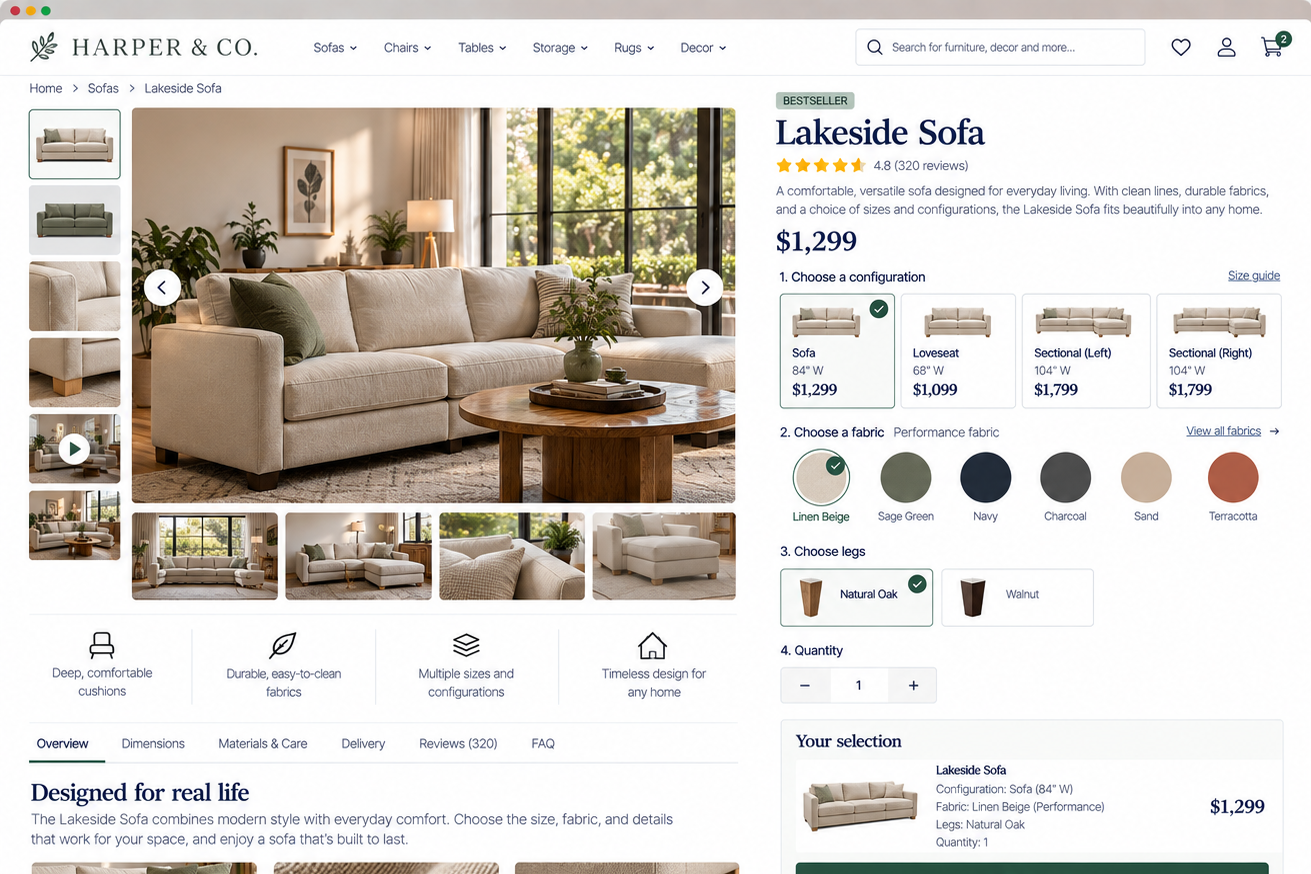
Product and Service Selection and Calls to Action
Can visitors make necessary selections and clearly understand what to do next?
A visitor might understand what you offer and decide it fits their needs, but still pause when it’s time to take the next step. They might need to pick a size, service level, date, or another option first. Sometimes, it’s not clear which selections they’ve made. Or the page presents so many choices that the next step gets lost.
At this stage, visitors shouldn’t have to work out what to do next.
Your product or service page should help them quickly understand:
Which option am I choosing?
Have my selections been captured correctly?
What do I do when I’m ready to move forward?
1. Clearly represent meaningful variations and configurations
UX Check: Can visitors understand the available options and how those choices affect what they’re getting?
Many products and services aren’t offered in just one form. A product might come in different sizes, colors, materials, capacities, bundles, or configurations. A service might offer different packages, durations, locations, support levels, or delivery methods.
Make it easy for visitors to understand those differences. Visitors should quickly understand which options are available, which can be combined, and how their choices affect what they get.
If a different configuration changes the price, availability, delivery timing, or included features, update that information right away.
For example, selecting a larger storage capacity might increase a product’s price. Choosing a different hotel room might change the occupancy and cancellation terms. Selecting a higher service tier might add deliverables or support.
Avoid asking visitors to pick between options with names that don’t clearly explain the difference. Labels such as Basic, Plus, and Premium are simple, but visitors still need to know what actually changes between them.
When options have real differences, explain those differences right where the choice happens.
2. Present selections clearly and preserve the visitor’s choices
UX Check: Can visitors easily tell what they’ve selected, and do those selections remain intact as they continue?
Once visitors start making selections, help them keep track of what they’ve chosen. Whether it’s a size, service package, date, location, or another option, make the selected state clear and show the combined result before they move forward.
For example, someone choosing Size: Medium, Color: Navy, Quantity: 2 should be able to confirm those choices before adding the product to their cart. The same applies to service levels, appointment types, locations, or other configurations.
Preserve selections whenever possible as visitors view more information, change options, encounter validation messages, or move to the next step.
When one choice affects another, explain what changed. If a new date makes a selected time unavailable, or a color isn’t available in the chosen size, make that clear rather than quietly resetting the selection.
Visitors should always know what they’ve selected and how changes affect their choices.
3. Provide a clear primary conversion action
UX Check: When visitors are ready to move forward, is the primary action easy to identify and understand?
Once someone decides your offering is right for them, the next step should be obvious. Use specific language that sets clear expectations, such as Request a Quote, Check Availability, or Schedule a Consultation rather than a vague Get Started.
Keep the primary action prominent without competing with too many secondary requests. Saving, asking a question, or exploring another option can still be useful, but shouldn’t distract from the main next step.
If visitors aren’t ready to proceed because a selection is missing or something is unavailable, clearly explain what they need to do.
Guide visitors from I’ve decided to here’s what to do next without adding confusion.
Make it easy to move from decision to action
By the time someone reaches this point, your product or service page has already done much of its work. The visitor understands the offering. They’ve evaluated whether it meets their needs. Now they need to choose the right version and move forward.
Show meaningful options in a way that makes the differences clear. Help visitors stay aware of what they’ve picked and keep those choices as they move forward. Then offer one clear main action that tells them exactly what happens next.
The decision point shouldn’t force visitors to stop and figure out how your website works. When visitors know what they’re choosing, what they’ve picked, and exactly what to do next, they can move forward with confidence.
Review your website experience
Your homepage is just one part of the experience visitors have with your website.
The Website Experience Snapshot is a free resource that helps you evaluate across nine areas of your website—from your homepage and navigation to conversion, mobile, accessibility, and the overall site experience. Use it to spot where visitors may be running into friction and where improvements could make the biggest difference.