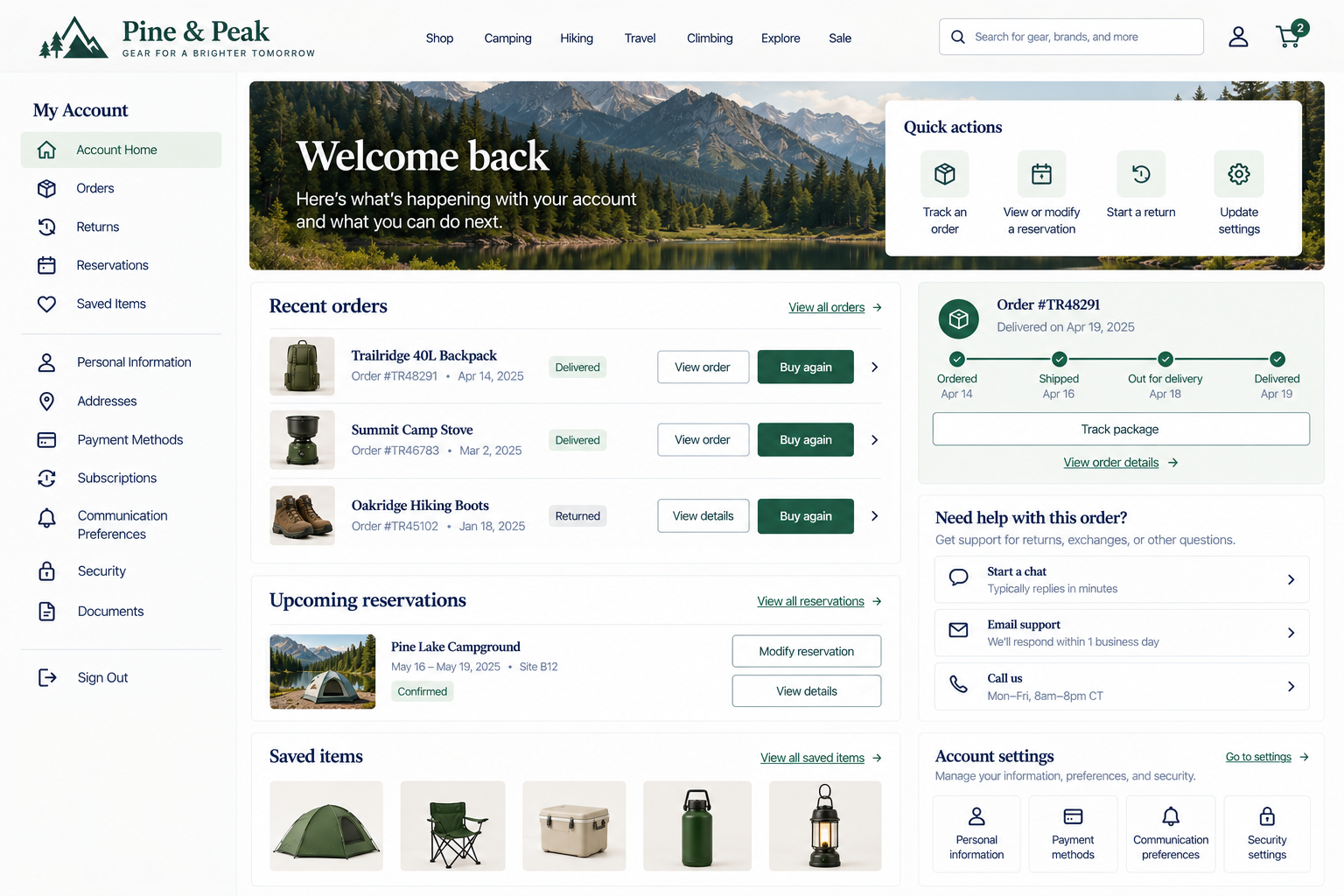
Post-Conversion Support and Account Management
Can customers easily return to manage their account, make changes, check status, or get help when needed?
A purchase, booking, application, or other conversion is not the end of a customer’s interaction with your website. They may need to return later.
An order might need to be tracked or returned. An appointment may need to be rescheduled. A reservation could change. Someone may want to update their payment method, download a document, check a request, or contact support.
Routine tasks should not force customers to start over.
Your website should help customers answer:
Where can I manage what I’ve already done?
Can I make changes or cancel when needed?
Where do I go if I need help?
Can I find the information, activity, and settings associated with my account?
1. Provide clear paths to modify or cancel when applicable
UX Check: If customers need to change or cancel something they’ve already completed, can they easily understand how to do it?
Plans change. Someone may need to reschedule an appointment, change a reservation, update an order, cancel a subscription, modify a service request, or return a product.
If changes are possible, make the process straightforward. Place relevant actions where customers are likely to look for them, such as the order, booking, subscription, or account area.
Explain any conditions clearly before customers start making changes. And when a customer completes a modification or cancellation, confirm what happened.
Customers should know if their booking still exists, if a cancellation was successful, or which version of their order is current.
2. Make post-conversion support easy to access
UX Check: If customers have a question or problem after converting, can they easily find the right help?
Post-conversion questions are often specific. Customers should not have to begin at a generic homepage or sales form to get answers. Provide support where it becomes relevant.
If customers need to contact someone, make the available options and expectations understandable.
Also preserve useful context. When possible, carry relevant details such as the order, reservation, account, or request into the support interaction.
Getting help should not require starting over.
3. Make account access easy and return visitors to the expected location after sign-in
UX Check: Can returning customers easily sign in and continue what they were trying to do?
Make account access easy to find when accounts play an important role in the experience. Use familiar labels such as Sign In, My Account, or Account rather than making customers guess where their information lives.
Think about what happens after sign-in too. Whenever practical, return customers to the task or location that prompted the sign-in.
Authentication should be a necessary step when needed, not a detour that forces customers to restart their task.
4. Provide a clear, task-focused account or dashboard home
UX Check: When customers enter their account, can they quickly identify the things they’re most likely to need?
An account homepage should do more than display all the information the system has about the customer. It should help them do something.
Prioritize common post-conversion tasks. Customers should not need to click through multiple pages to find a recent order or upcoming appointment.
Recent and active items often deserve more prominence than old activity.
The account home should answer a practical question: What am I most likely here to manage?
5. Organize account features and activity so they are easy to find and understand
UX Check: Can customers find past and current activity without having to understand how our internal systems organize it?
Accounts can accumulate a lot of information over time. Organize that information around recognizable customer tasks.
Labels such as Orders, Appointments, Billing, Documents, and Returns are usually easier to understand than internal terminology.
Help customers distinguish current activity from historical information. Search, filtering, sorting, or grouping may become useful as activity grows.
Customers should not need to understand your internal systems to find their own information.
6. Make authentication usable and proportionate
UX Check: Does signing in protect the account appropriately without creating unnecessary difficulty for routine tasks?
Authentication should protect customer information without creating unnecessary friction. Stronger security may be appropriate for sensitive accounts, while lower-risk tasks may require less.
Support password managers, clear password requirements, straightforward account recovery, and understandable verification steps. Avoid unnecessary sign-ins or restrictions that don’t match the sensitivity of the task.
Security should protect customers without making legitimate access unnecessarily difficult.
7. Make account information, preferences, and settings easy to manage
UX Check: Can customers easily find and update their own account information and preferences?
Customers should be able to manage routine account information and preferences without contacting support.
Organize related settings clearly and use familiar terminology for information like contact details, payment methods, security, notifications, and subscriptions.
Explain any consequences before changes are confirmed, and provide clear feedback when updates are saved.
Customers should understand what they can manage and be able to do it easily.
Help customers manage what comes next
The customer’s relationship with your website doesn’t end when the conversion is complete. They may need to return tomorrow, next week, or months later. Give them clear ways to make changes when appropriate. Make support easy to access. Help returning customers get back to the task they were trying to complete. Organize accounts around meaningful activities and make routine settings manageable.
Most importantly, avoid making customers re-enter information the website already knows. Post-conversion support should help customers move from I already did this to here’s how I manage what happens next.
Review your website experience
Your homepage is just one part of the experience visitors have with your website.
The Website Experience Snapshot is a free resource that helps you evaluate across nine areas of your website—from your homepage and navigation to conversion, mobile, accessibility, and the overall site experience. Use it to spot where visitors may be running into friction and where improvements could make the biggest difference.