Making Website Content Accessible
Can visitors access and understand important content regardless of how they see, hear, or interact with the website?
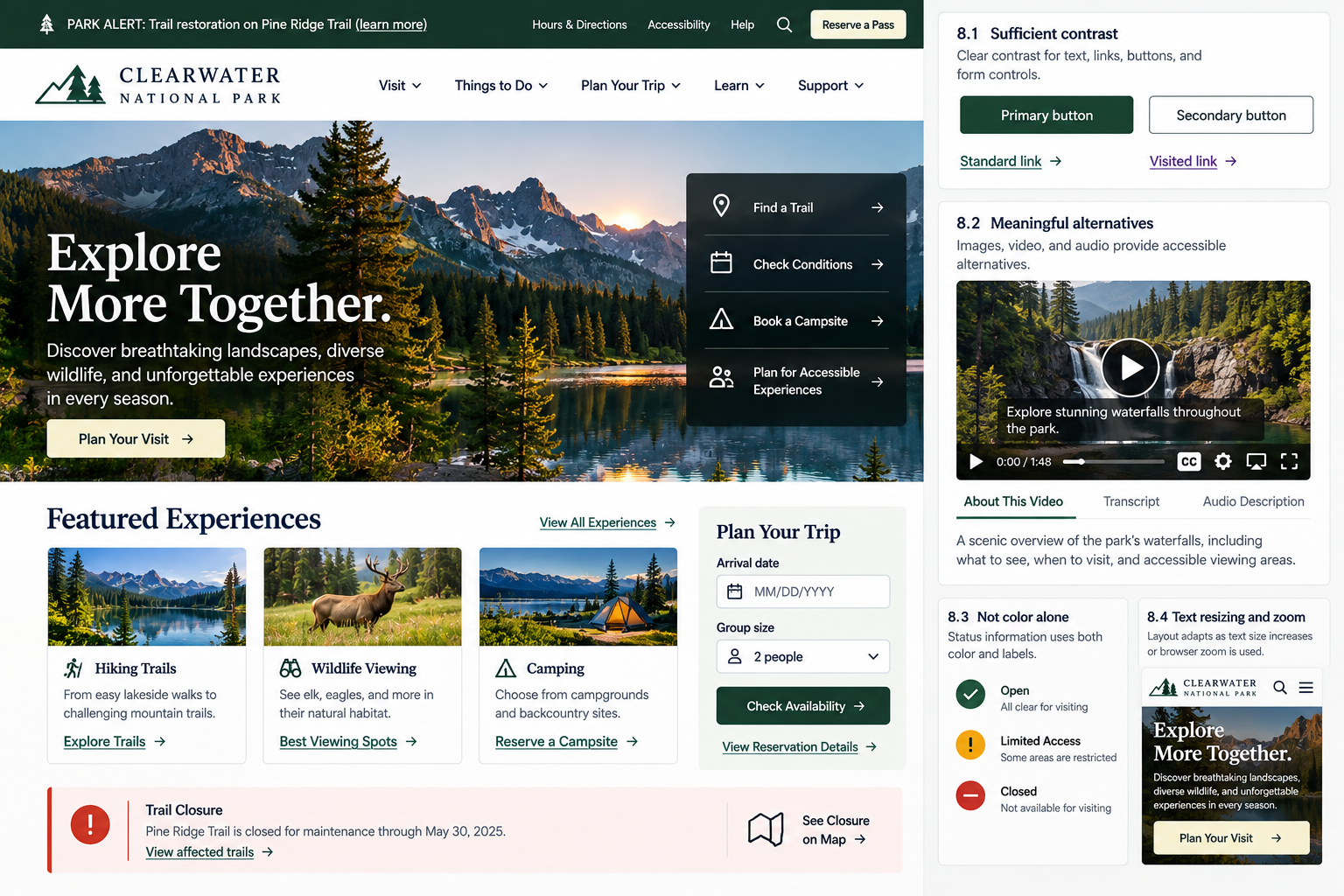
Visitors don’t all experience your website in the same way. Some may have low vision or color vision differences. Some may enlarge text or zoom the page significantly. Others may use a screen reader to access visual content or rely on captions instead of audio.
Accessibility begins with making sure people can get the information they need in a way that works for them.
Your website should help ensure that:
Text and important interface elements are easy to distinguish
Important visual, audio, and video information has an appropriate alternative
Meaning doesn’t depend on recognizing a particular color
Visitors can enlarge content without making the website unusable
1. Provide sufficient text and interface contrast
UX Check: Can visitors easily distinguish important text, controls, and interface elements from their backgrounds?
Low contrast can make content difficult to read, especially for visitors with low vision or age-related changes in vision. Check contrast across body text, headings, links, buttons, form labels, error messages, navigation, and other important interface elements.
Make sure controls and their states are also easy to distinguish. Form field boundaries, selected states, and button outlines shouldn’t blend into the surrounding page.
Be especially careful with text over images, since readability can change as images are cropped across screen sizes. Use overlays, solid backgrounds, or other treatments when needed, and use accessibility testing tools to verify sufficient contrast rather than relying only on visual judgment.
2. Provide meaningful alternatives for visual, audio, and video content
UX Check: If someone can’t see or hear this content, can they still access the important information it provides?
Meaningful images, audio, and video should provide alternatives so visitors can access the important information even if they can’t perceive the original content.
For images, provide text alternatives that communicate their purpose or important information. Decorative images generally don’t need descriptions, while icons used as controls need accessible names.
Provide captions for spoken video content and transcripts for audio when appropriate. If important visual information isn’t conveyed through the audio, provide a description or another way to access it.
The goal isn’t simply to add alt text or captions. It’s to make sure visitors can access the information they need in another form.
3. Do not rely on color alone to communicate meaning
UX Check: If visitors can’t distinguish the colors we’re using, can they still understand what the website is communicating?
Color can reinforce meaning, but it shouldn’t be the only way important information is communicated.
Use additional cues such as labels, icons, patterns, underlines, or clear messages for errors, status indicators, availability, selections, links, and other important information.
For example, pair color-coded statuses with labels like On Track, Needs Attention, or Delayed. Use color as one layer of communication rather than the only indicator.
4. Support text resizing and browser zoom without loss of usability
UX Check: Can visitors enlarge the website when they need to without losing information or functionality?
Visitors should be able to enlarge text or use browser zoom without losing content or functionality.
Make sure text isn’t cut off, controls and labels remain accessible, and content doesn’t overlap or disappear off screen. Pay particular attention to navigation, forms, tables, cards, modals, and other space-constrained areas.
Allow layouts to adapt as content becomes larger. The goal isn’t to preserve the original layout, but to ensure visitors can still access information and complete important tasks.
Make important information available in more than one way
Accessible content doesn’t mean every visitor has the same experience. It means making sure people can still access and understand the information they need.
Provide sufficient contrast, offer appropriate alternatives for meaningful media, don’t rely on color alone to communicate meaning, and allow visitors to enlarge content without losing information or functionality.
The goal is to make important information accessible in different ways, rather than requiring everyone to experience the website in the same way.
Review your website experience
Your homepage is just one part of the experience visitors have with your website.
The Website Experience Snapshot is a free resource that helps you evaluate across nine areas of your website—from your homepage and navigation to conversion, mobile, accessibility, and the overall site experience. Use it to spot where visitors may be running into friction and where improvements could make the biggest difference.