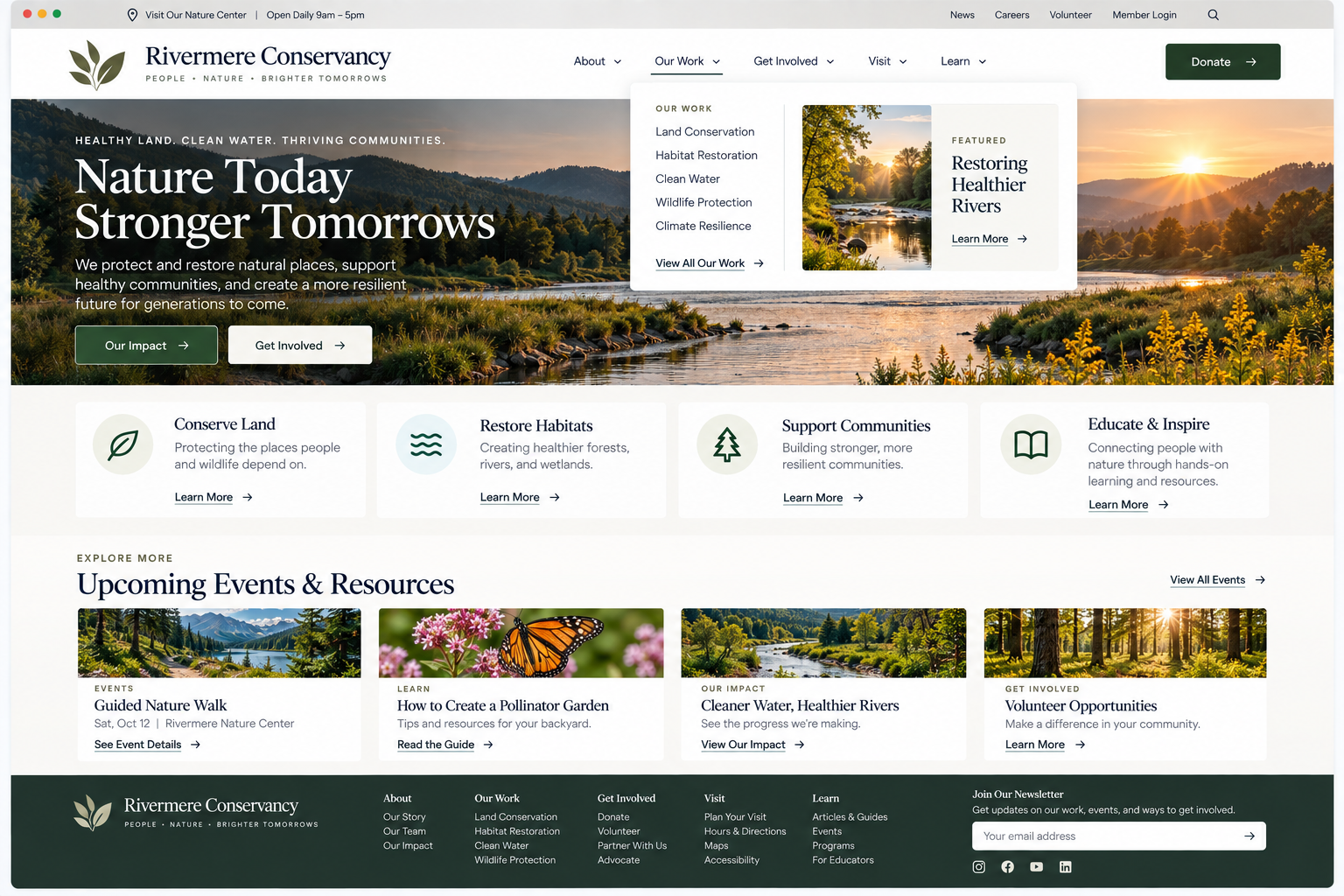
Website Navigation
Can visitors move through the website using a clear hierarchy and familiar navigation patterns?
Visitors shouldn’t have to learn how your website works before they can use it. Navigation helps people understand what your website offers and how to get to the information they need. When navigation is clear, visitors can quickly spot where to find your products, services, resources, contact details, or other key content.
If navigation is confusing, even a well-organized website can feel hard to use.
Your navigation should help visitors quickly understand three things:
How do I move around this website?
Where can I find the most important information?
What will I find when I select each option?
1. Use familiar and predictable navigation patterns
UX Check: Does our navigation work in ways visitors are likely to recognize and understand?
Visitors expect navigation to follow familiar patterns and behave consistently. Using recognizable menus, links, drop-downs, and interactions makes it easier to move through your website without extra effort.
Navigation can vary based on the size and complexity of the site, but how it works should always be clear. Use supporting areas like utility and footer navigation for secondary destinations when appropriate.
2. Make important destinations easy to access from the primary navigation
UX Check: Can visitors easily reach the destinations that matter most without sorting through unnecessary options?
Use your primary navigation for the destinations that matter most to visitors rather than trying to include every page.
Prioritize key tasks and content, group related pages under broader categories, and use utility or footer navigation for secondary destinations.
The goal is to make the most useful options easy to find without overwhelming visitors.
3. Use clear and specific navigation labels
UX Check: Can visitors predict what they’ll find before selecting a navigation option?
Navigation labels should help visitors predict what they’ll find before they click.
Avoid vague, overlapping, or internal terminology that requires visitors to guess.
Labels don’t have to be generic, but they should be specific and familiar enough to make the next step clear.
Navigation should help visitors find their way
Good navigation does not need to stand out. It needs to help visitors move through the website without unnecessary guesswork.
Use patterns people recognize. Make sure important destinations are easy to spot. Use labels that help visitors know what to expect.
Supporting navigation, dropdown menus, utility links, and footers all have a role, but they should work together as a clear system instead of competing to show everything at once.
When visitors can quickly understand how to navigate, where important information lives, and which option is likely to lead them there, finding their way around your website becomes much easier.
Review your website experience
Navigation is just one part of the experience visitors have with your website.
The Website Experience Snapshot is a free resource that helps you evaluate nine areas of your website—from your homepage and navigation to conversion, mobile, accessibility, and the overall site experience. Use it to spot where visitors may be running into friction and where improvements could make the biggest difference.