Website Reliability and Error Recovery
Is information accurate and current, and can visitors recover from problems or continue important tasks without unnecessarily losing progress?
Visitors expect your website to work. They want up-to-date information, reasonable loading times, responsive buttons, and the ability to complete important tasks on the devices and browsers they use.
But websites are not always perfect.
Connections fail. Payments are declined. Forms encounter errors. Products become unavailable. Pages break. Sessions expire. Visitors close a tab and return later.
A reliable website is not expected to prevent every possible problem. It should work dependably in normal situations and help people recover when something goes wrong.
Visitors should be able to trust that:
The information they’re using is accurate and current
Important content and functionality will be available when they need it
The website will tell them what’s happening when something takes time or fails
They won’t unnecessarily lose their work or progress
1. Keep information accurate and current
UX Check: Can visitors trust that the information on our website reflects what we actually offer right now?
Outdated or conflicting information can affect visitor decisions and make it harder to complete important tasks. Regularly review details such as pricing, availability, hours, services, policies, deadlines, locations, and contact information.
Pay particular attention to information that appears in multiple places so updates remain consistent across the website.
Prioritize content that affects visitors’ decisions, expectations, eligibility, costs, availability, or ability to complete a task.
People should not have to reach out just to confirm whether your website information is still accurate.
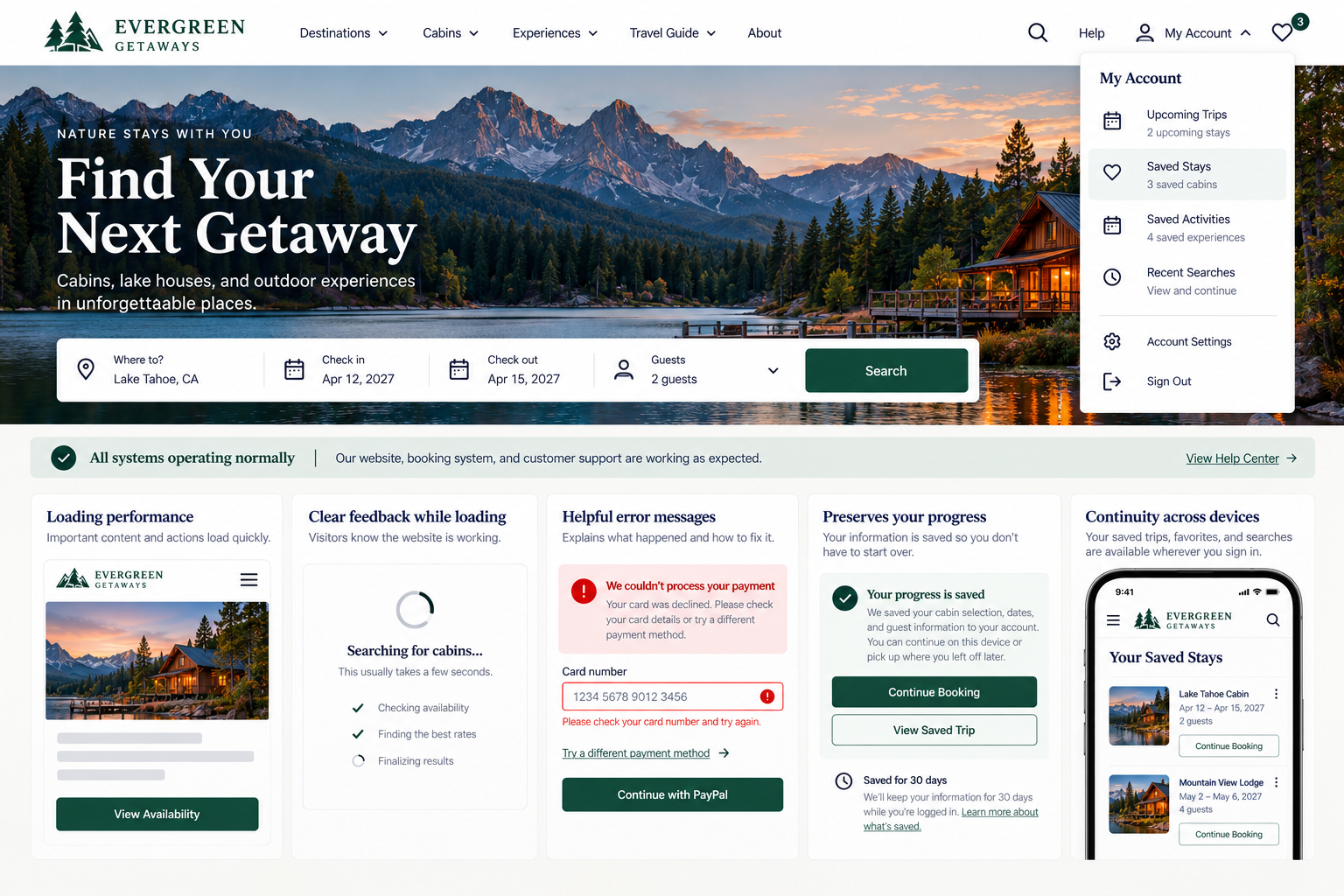
2. Provide acceptable loading performance and prioritize critical content and actions
UX Check: Can visitors access the information and actions they need without unreasonable waiting?
Slow pages can make a website feel broken and interfere with important tasks like searching, booking, completing forms, or making a purchase.
Prioritize performance on important pages and make critical content and actions available before secondary elements such as decorative media or third-party tools.
Consider how images, video, fonts, scripts, ads, and other resources affect loading and responsiveness. The goal is to help visitors reach and use important content without unnecessary delay.
3. Provide clear feedback while the website is loading or processing
UX Check: When something takes time, can visitors tell that the website received their action and is still working?
When an action takes time, give visitors clear feedback so they know the website is working rather than unresponsive.
Use loading indicators, progress messages, upload percentages, or specific updates such as Processing your payment…. For longer processes, provide a reasonable sense of what’s happening and what to expect.
When necessary, prevent duplicate actions so visitors don’t accidentally submit, purchase, or book something more than once.
4. Maintain stable layouts and interactions
UX Check: Does the website stay visually and functionally stable while visitors are trying to read or interact with it?
Content and controls shouldn’t shift unexpectedly while visitors are reading or interacting with a page. Reserve space for images, ads, banners, and other elements when possible so late-loading content doesn’t rearrange the page.
Interactions should remain stable as well. Buttons shouldn’t suddenly move, forms shouldn’t unexpectedly reset, and menus shouldn’t close because unrelated content changed.
Dynamic updates may be necessary, but they shouldn’t cause visitors to lose their place or take an unintended action.
People should be able to read, select, and interact without the interface shifting while they use it.
5. Maintain reliable functionality across supported environments
UX Check: Do important features work reliably across the devices, browsers, and environments we intend to support?
Important website features should work reliably across the browsers, devices, screen sizes, and operating systems your visitors commonly use.
Prioritize testing critical tasks such as browsing, searching, completing forms, purchasing, booking, registering, accessing accounts, and getting help. Don’t assume a responsive layout means every feature works everywhere.
Include third-party tools such as payment systems, scheduling platforms, forms, and chat in your testing. To visitors, they’re part of the overall website experience.
6. Provide useful error messages and clear recovery paths
UX Check: When something goes wrong, does the website help visitors understand the problem and what they can do next?
When errors occur, explain what happened in language visitors can understand and provide a clear way to recover.
Avoid vague messages like Something went wrong or technical details visitors can’t act on. Instead, explain what they can try next, whether that means correcting information, retrying an action, choosing another option, or taking a different path.
A useful error message helps visitors understand what happened and what they can do next.
7. Preserve visitor work and progress during failures
UX Check: If something fails, will visitors have to redo work they’ve already completed?
When something goes wrong, preserve valid information and selections whenever possible so visitors don’t have to repeat work they’ve already completed.
If a form has an error, keep correct entries. If payment fails or availability changes, preserve selections that still apply. For longer processes, consider allowing visitors to save their progress and return later.
Balance convenience with appropriate handling of sensitive information. Preserve as much useful progress as is safe and reasonable.
8. Maintain continuity across devices and sessions when appropriate
UX Check: When visitors return later or continue on another device, can they pick up where they reasonably expect to?
Some tasks naturally happen across multiple visits or devices. When appropriate, preserve useful information such as carts, saved applications, favorites, shortlists, bookings, or other progress so visitors don’t have to start over.
Set clear expectations about what is saved, whether an account is required, and when saved information expires.
Consider privacy, security, and sensitivity when deciding what to retain. Continuity should reduce repeated work and help visitors complete tasks over time.
Make Your website dependable when things don’t go perfectly
Reliability is about creating an experience visitors can depend on, including when something takes longer than expected or goes wrong.
Keep important information current, make critical content and actions readily available, and let visitors know when the website is processing something. Keep pages stable and make sure important features work across the environments you support.
When problems occur, help visitors recover without losing their progress. When appropriate, preserve useful information if they leave, return later, or switch devices.
The goal is to help visitors continue what they’re doing even when the experience doesn’t go as planned.
Review your website experience
Your homepage is just one part of the experience visitors have with your website.
The Website Experience Snapshot is a free resource that helps you evaluate across nine areas of your website—from your homepage and navigation to conversion, mobile, accessibility, and the overall site experience. Use it to spot where visitors may be running into friction and where improvements could make the biggest difference.