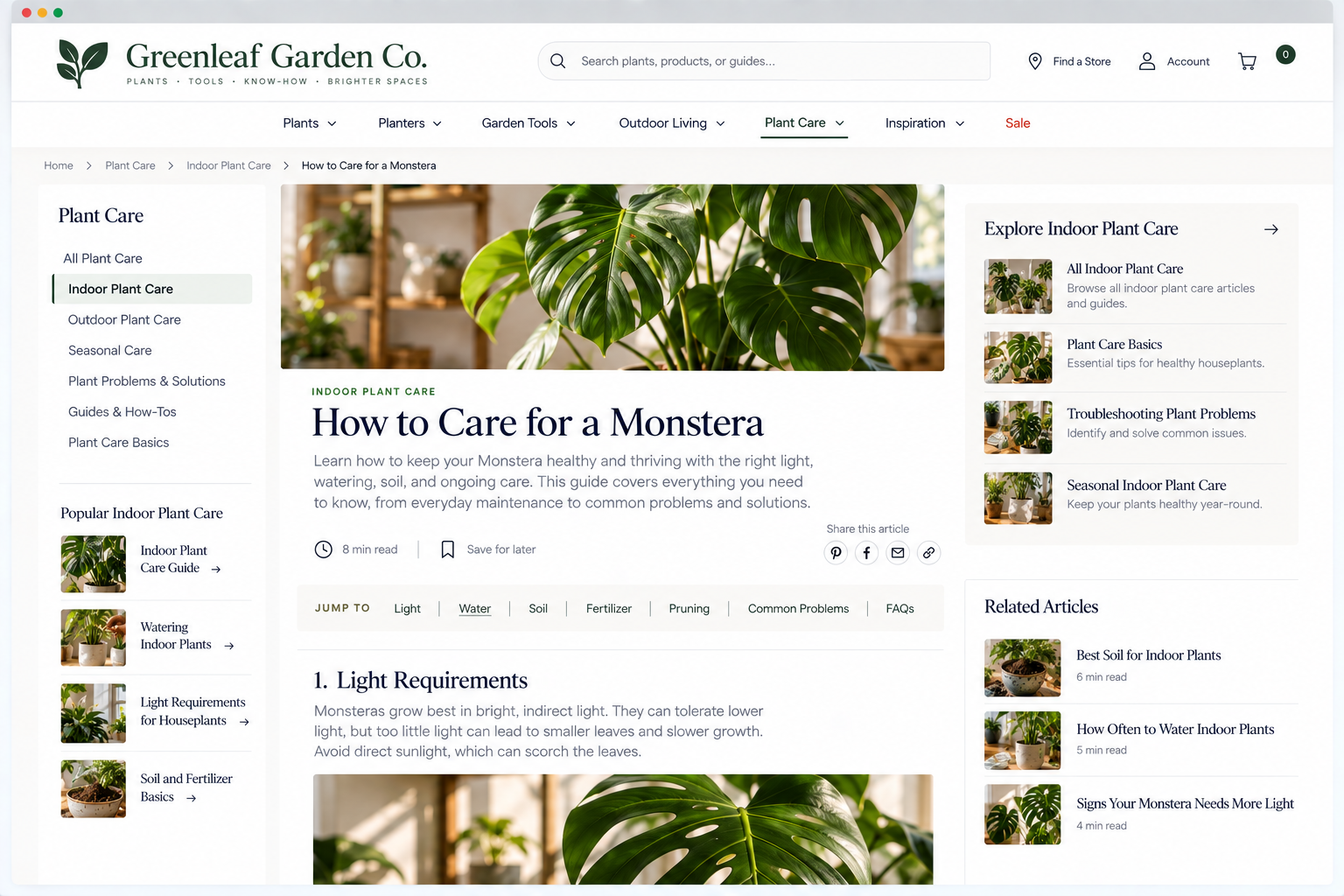
Website Orientation
Can visitors understand where they are and move between related pages without losing context?
Finding a page is only part of navigating a website. Visitors also need to understand where they are once they get there.
On a small website with just a few pages, this is usually straightforward. As websites grow, though, visitors move through categories, subcategories, product or service pages, articles, search results, and other layers of content.
Many visitors arrive directly on an internal page from a search engine, social media, email, or another website, often without seeing your homepage at all.
Your website should make it easy for visitors to quickly answer four questions:
Where am I?
What broader section does this page belong to?
How can I move to related or broader information?
How can I get back to a familiar starting point?
1. Clearly communicate the visitor’s location within the website
UX Check: Can visitors tell where they are and how the current page fits into the rest of the website?
Give visitors enough context to understand where they are and how the current page fits into your website.
Use clear page titles and, when appropriate, navigation highlights or breadcrumbs to reinforce location.
More complex websites typically need stronger orientation cues, while simpler sites may only need clear titles and straightforward navigation.
2. Make it easy to move between detailed and broader sections
UX Check: Can visitors easily move from a specific page to the broader section it belongs to?
Visitors may land on a specific page and then want to explore the broader section or related content.
Use breadcrumbs, category links, contextual navigation, or related links to connect individual pages with the sections they belong to. These connections help visitors explore without returning to the homepage and starting over.
3. Provide a consistent path to the homepage
UX Check: Can visitors easily return to the homepage from anywhere on the website?
The homepage provides a familiar place for visitors to reset, orient themselves, or explore the website more broadly.
Make it easy to return from anywhere on the site, typically by linking the logo to the homepage and using a Home link where appropriate. Keep this behavior consistent across all pages.
4. Preserve navigational context when visitors move through the website
UX Check: When visitors move from one page to another, does the website help them maintain their sense of where they are?
Help visitors keep track of where they are as they move between pages.
Use navigation states, breadcrumbs, category labels, related links, or preserved filters and results to maintain context.
Visitors should be able to explore, compare, and return without losing their place or starting over.
Help visitors maintain their sense of place
Visitors should not have to remember every step they took through your website. Your website should give them enough context to know where they are, how the current page fits into the rest of the site, and what their next steps could be.
Make it clear which page and section visitors are on. Make it easy to move between detailed and broader information. Always provide a reliable way back to the homepage. And keep useful context visible as visitors move from page to page.
When visitors know where they are, how they got there, and how to move forward, exploring your website feels much easier.
Review your website experience
Website orientation is just one piece of the overall experience visitors have on your website.
The Website Experience Snapshot is a free resource that helps you evaluate nine areas of your website—from your homepage and navigation to conversion, mobile, accessibility, and the overall site experience. Use it to spot where visitors may be running into friction and where improvements could make the biggest difference.