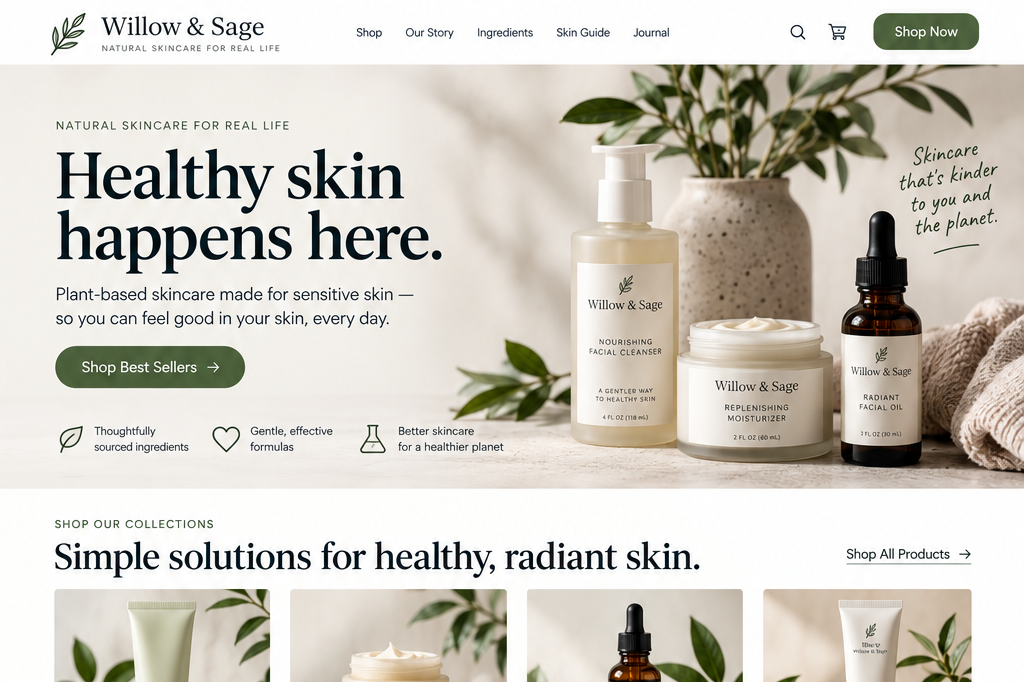
Homepage Messaging
Can visitors quickly understand what your organization does, who it’s for, why it matters, and what you offer?
A homepage can look polished and professional, yet still leave visitors unclear about what your business offers.
First-time visitors should not have to sort through vague headlines, unfamiliar service names, scattered copy, or unrelated images just to understand if your business is relevant to them.
Your homepage doesn't need to explain everything. But it should help visitors quickly understand four things:
What do you do, and who is it for?
Why does it matter?
What do you offer?
Does everything on the page support that understanding?
1. Make the organization’s purpose and intended audience immediately clear
UX Check: Would someone unfamiliar with your business understand what you actually do?
When you work closely with your own business, it can be hard to spot when your messaging is too broad. Words that seem meaningful to you often rely on context only you have.
Take a headline such as “Transforming possibilities into impact.” It sounds impressive, but it could apply to almost any type of organization, from consulting firms to nonprofits to tech companies.
Phrases such as “innovative solutions” or “unlock your potential” might capture your values, but they leave visitors guessing about what you actually offer.
Visitors need to quickly understand if your business is a fit for them. You don’t have to rely on a formula like “We help [audience] do [thing].”
Show who you serve by highlighting the problems you solve, the industries you work with, the situations you address, or the results you help people achieve.
2. Communicate a meaningful and differentiated value Proposition
UX Check: Would visitors understand why what we offer might be useful to them, and what distinguishes our approach?
Explaining what you do is only the starting point. Visitors also need to understand why your offering is relevant to them and what value it provides.
Focus on the problem you solve, the outcome you help people achieve, and what sets your approach apart from other options.
Think about what someone is trying to accomplish when they arrive on your website and how your product or service helps them get there.
You don’t need big promises or exaggerated claims. Phrases like “transform your business” or “unlock your potential” may sound compelling, but they don’t help if visitors still aren’t clear on what you actually do or why they should consider you.
Real differentiation comes from being specific. That might mean clearly communicating who you help, the particular problem you address, how your approach works, what’s included in your offering, or the expertise and experience you bring.
The goal is to give visitors a meaningful reason to see your offering as relevant to their needs.
3. Represent and appropriately prioritize the organization’s offerings
UX Check: Can visitors quickly identify what we offer and understand which options are most important or relevant to them?
Your homepage should give visitors a clear sense of what you offer.
For a service business, that might mean introducing your primary services. For an e-commerce business, it could mean showing important product categories. For a nonprofit, it might mean explaining its primary programs or resources.
The homepage doesn't need to explain every detail. That's the purpose of your product and service detail pages.
Instead, your website’s homepage should help visitors understand:
What your main offerings are
How they differ
Which options may be relevant to different needs
Where to learn more
Prioritization matters. If you give every service, audience, promotion, and message equal emphasis, visitors are left to figure out what's most important.
Think about what visitors need to understand first for the rest of the page to make sense. Your most important offerings and messages should stand out more than secondary information.
4. Use imagery that supports understanding
UX Check What does this image help a first-time visitor understand?
Homepage images influence how visitors understand your business and can shape their first impression before they read the details.
For example, a consulting firm might use a large mountain photo to suggest growth or new possibilities. While this feels clear to the team, a new visitor does not have that background. The same image could just as easily fit a travel agency, an outdoor gear brand, a wellness retreat, or a financial services company.
You do not need every image to show your product or service. Decorative visuals can help set the tone and support your brand. Still, the main images should not distract from or confuse your core message. They should reinforce what you are saying, not leave visitors guessing about their purpose.
Depending on your business, showing product photos, screenshots, examples of your work, or images of your service in action can help visitors quickly understand what you offer.
The key is whether the imagery supports the impression you want visitors to have.
Problems arise when visuals suggest something different from the actual business or force the copy to work harder to explain what you do.
Your homepage doesn't need to say everything
Making your homepage easier to understand does not mean adding more information. Visitors don't need your full company history, every detail of every service, every testimonial, every feature, or an answer to every possible question before they can move forward.
Visitors need enough information to know where they have landed, whether the business is relevant to them, and what they may want to explore next. That's the foundation your homepage needs to establish.
If visitors do not quickly understand what you do, who you serve, why it matters, and what you offer, everything else on the homepage becomes much harder.
Review your website experience
Your homepage is just one part of the experience visitors have with your website.
The Website Experience Snapshot is a free resource that helps you evaluate across nine areas of your website—from your homepage and navigation to conversion, mobile, accessibility, and the overall site experience. Use it to spot where visitors may be running into friction and where improvements could make the biggest difference.